Up next on the roadmap
This video is from Wagtail Space.
Our core contributors review 6 additions to the project roadmap https://wagtail.org/blog/our-roadmap-for-the-next-6-months/
Transcript
7,967 words
· auto-generated
· en
Show
Automatically transcribed, so expect mistakes in names and technical terms.
Speaker 1: You should hide the the octopus uh or you should have a bird instead of the octopus.
Speaker 2: That would be nice.
Speaker 3: Well are we making a plushie?
Speaker 1: That'd be cool.
Speaker 2: We have discussed making plushies, Sage. And we're live. Ooh, say she's bringing up the gear.
Speaker 3: Could you hear it?
Speaker 2: Yeah, yeah.
Speaker 3: Okay.
Speaker 2: Oh mic drop moments. Thank you Sage for a lovely introduction to today's episode. Welcome Baptiste. Welcome Sage to the Wagtail Review.
Speaker 3: Welcome.
Speaker 2: And today we are discussing the latest updates on our project roadmap and anything else we feel like it, I suppose.
Speaker 3: Is that how we roll?
Speaker 2: It's definitely how we roll. Have you seen the new roadmap yet, Baptiste?
Speaker 1: I haven't checked it today.
Speaker 2: Okay. Any expectations, any concerns, any like hot topics?
Speaker 1: Well I mean I know that we've s shift shipped uh autosave so I feel like there's no more features to be had so I'm very uh like Wagtail is not perfect, so I I really don't see what can be on the roadmap So
Speaker 3: that's the end game?
Speaker 1: Yeah, I think so.
Speaker 2: It's actually you know you make
Speaker 1: this mode
Speaker 2: You're joking, but our in our recent discussions there has been a regain in people saying that, oh yeah, we definitely have enough features now and we should stop uh adding more and we should instead focus on making what we have right now better Which I I definitely like that sentiment. Am I giving a fair treatment to how this has been brought up, Sage, or Is that too fluffy?
Speaker 3: Um no, I I think it's fair to say that we do have quite a lot of features already. Uh the uh the ones that you would expect from a CMS. Um and I would love to, you know, make improvements to what we already have, like also maybe optimizing performance. Um but uh there are still some features I think that Would warrant some investment into our CMS to make it even better.
Speaker 2: I um a few months ago I did an accessibility audit of Wagtail and it was for a standard named ATAG. As part of meeting that standard, you're encouraged to have documentation for all of your features, which is a pretty natural way to make them more accessible. So I had to quantify which features we have in Wagtail for CMS users Do either of you want to hazard a guess? Like how many features do we have in total in the end?
Speaker 1: At least five.
Speaker 3: How how do you define a feature?
Speaker 2: I think the idea in my mind when I did this was something that probably warrants having a name and a paragraph in documentation. So you know definitely a subjective definition right there, but at least something that will warrant writing down and explaining a bit So like maybe for example uh being able to order a list of pages by a field, maybe that's a feature. Maybe ordering like ascending and descending, maybe that's not like to that degree of granularity. Does that make sense?
Speaker 3: Yeah, I think so.
Speaker 2: Take a guess, how many?
Speaker 3: Do we hit uh uh the realm of hundreds?
Speaker 2: I think so.
Speaker 1: Yeah, I would say triple digits, but not quadruple.
Speaker 2: Yeah.
Speaker 1: Between a hundred and nine hundred and ninety-nine.
Speaker 2: I'll show you in the in the screen share. Uh The current estimation is 148 across 19 different areas of the CMS. um but i i do think this is under counting by um by quite a bit like for example table listing is a single feature in But anyway, for today we want to talk about the next improvements features or no um we have just published the latest version of the roadmap There is uh 11 things on there that we've
Speaker 2: um either added or moved around a bit. And um yeah, we thought it would be very interesting to go through them in order a bit, uh discuss what we all think of them. For people who might not know , we have four uh releases of Wagtail a year with um like features and other like kind of major improvements, not necessarily for major releases, but definitely for releases that we encourage people to upgrade to. After each and every one of those releases, we try and update the roadmap with what we want to do in the next two releases after So we don't have like super
Speaker 2: super long future commitments. But honestly, for a product of our size, it's already quite a lot to commit to the next six months worth of uh changes to the project. I had a look actually earlier today at um how well we're doing on our our commitments, like expectations versus reality of what uh we ship. I thought Baptiste and Sage would both find this very interesting. uh this um this bar chart is over all of our releases over the years how much we have committed to and shipped versus things we decided to skip So the light blue things here, that's when we just we had items on the roadmap for a given release
Speaker 2: and then just didn't make it. I find it really interesting to see the patterns over time and I think right about Wagtail 6. 0 I recall us having lots of discussions about wanting to commit to fewer things. and having higher success rates. I see you smiling, Sage. Did we succeed?
Speaker 3: Well, let's look at the numbers I suppose.
Speaker 2: Yeah, as um as a percentage Back then we were in the 70 to 90 percent success rates range and now we're in the 70 to 90% success range. So I think what might have happened more than anything is just there's there's fewer items we skip. Because there's fewer items we commit to rather than necessarily us like hitting a hundred percent. Um We're at um on average about six uh things we commit to in in the roadmap and then with that six it's much much simpler to meet five out of six
Speaker 2: not have a situation where you know we only ship um half or two-thirds of what we had committed to
Speaker 3: I think it's also worth noting that the items come in different shapes and sizes. Like for example, Otosave. That's quite a big one compared to Well, pretty sure we have some smaller ones in the roadmap as well, right?
Speaker 2: Yep. There's um something we started doing more recently on those sizes not necessarily report as in like make it super visible but at least keep track over time um so this uh this um view here is um all our roadmap items are github issues on the separate roadmap projects and then it allows us to add metadata like our understanding of the size of those roadmap items Lots of medium, but also definitely some that are very chunky and some that are very small. And not always necessarily the ones you'd expect, to be honest. um Wagtail Space uh flagship online conference last year. I don't think people realize how much work it is to put together a conference.
Speaker 2: For almost 400 people, uh even as only a two-day event, that's uh a massive amount of work. What do you think Batist? Do we have a good um track record there?
Speaker 1: Well you said the T-word. Um I'm curious how many of the skipped feature were dropped versus just moved to the maybe the next release or is there data on that?
Speaker 2: Yeah, there's definitely data. Um I don't know what would be the simplest way to see this. Um on here like in bulk mode uh because we do like update all of the metadata then if you look at um um hmm Choose those UI improvements as those are GitHub issues you can clearly see when we move them around in milestones and project states. So this one, for example, we added to the the future milestone in July as a new thing and then we moved it to a specific release. uh yesterday
Speaker 2: um things that are moving in the other way around if we look at uh natural language search we're very eager to have it in the next May release when we added this back in November, but now had to be more realistic and move it to the future bucket. I think aside from that, just unpacking a bit more how all of this works, we use our RFC system to um share all of our updates to the roadmap not just like how we intend to build specific features And uh this RFC system um very recently we started putting this table that
Speaker 2: uh states for the past feed what do we think is our assessment of what we've done or not done and um yeah so for example this polish sites showcase It's uh closed on the roadmap because we don't think it makes too much sense to have it on the roadmap anymore, even though it hasn't been completed. Why are we missing? Oh I forgot to merge the latest set of roadmap updates. Which definitely have enough review now and um approvals from the core team for us to do this. Um yeah, so in that sense it was
Speaker 2: similarly It will similarly show you that natural language search we decided to move it to the future bucket and why we did that. Do you think it helps to um share those uh sizes more widely to our um practical users? Or is it kind of like for our own benefit that we try this?
Speaker 1: I think both. No
Speaker 2: Yeah.
Speaker 1: You you never really know like that's the the magic of open source is that there's always someone that relies on some data that you sometimes you know you don't even realize that people have workflows or They rely on information you have and uh if you have the data putting it out there uh is good I think. That's the one of the strength of working in the open is that You don't really have to think you that's your process, you publish it and people can rely it rely on it or not. I think most users don't care, is my guess. But some probably do.
Speaker 2: Um yeah, for the people who do care, we love the feedback on a stress. Uh definitely the reason we added this is because people said oh it would be nice to know, have a sense recently We also started adding uh images to all of our roadmap items or whenever possible to try and illustrate them a bit better for people who um you know uh make it easier for them to understand what is going on. Um anyway let's look at the next um release shall we sage do you have um preference of which item we start with
Speaker 3: Well, we just discussed or rather mentioned um autosave, so why is it still in in the roadmap?
Speaker 2: Tell us more, Sage, why is it on the roadmap?
Speaker 3: Yeah, um so I think previously we had it on the roadmap as autosave MVP for the previous release that we just shipped. And now that the MVP has shipped, um, it is uh it works pretty well, uh yeah, pr uh I I would say. But there are some enhancements in the UI UX site, I think, that would make the experience better. For example, um our divert validation uh feature Well uh it it's still it at the moment it doesn't support string fields, so if you add new blocks um and it it has a required text field, for example, you'll be created with a validation error.
Speaker 3: Um and that's one of the things that we'd like to address in the next release so that as you add more blocks um while editing the page. Autosave can still continue without you having to fill out those required text blocks and uh some other small polish around the UI, like making sure there's um no layout shifts in the autosave indicator in the header for example But yeah, I'm sure there are a bunch of other enhancements we can make as we also gather feedback from users who have upgraded to the current latest version.
Speaker 2: Yep, exactly. And I definitely noticed while using autosave myself, first off, how nice it is and how much time it saves me. Like it's just one one less thing to worry about as I walk on my page. But also how much more the um Error handling of it matters because if I start to rely on it working on its own in the background, then I just notice way more when it stops working Whereas you know, if it's like I click a button and something breaks, then like um first off I think that's that's much rarer for it to break in in that situation, but also like I'll know to take action right away. With the auto-save version, it kind of takes you a bit out of the flow that you have to worry about why there's an error.
Speaker 2: So much important for us to handle it gracefully. Yes, keeping those required fields, letting people, you know, get to them in their own time. That feels really, really helpful in that respect. Baptiste, I don't know if you had a chance to use autosave just yet.
Speaker 1: Not yet, no.
Speaker 2: Okay.
Speaker 1: I haven't worked on a project with a new enough work tail.
Speaker 2: Yeah. Yeah, definitely diffusion of those features is um is a really big deal for us. Another tangent that I could show you aside from this graph of roadmap items is our understanding of how much people download or upgrade to the new releases, which um you know it's Really important for us if we ship features that people do take the time to upgrade their sites to use them. And here you can definitely tell that At the point where we make a new release, only about 50% of our downloads are for the previous latest release. So there's definitely lots of people that have taken the time to upgrade to latest
Speaker 2: in the last release cycle, but just as many people who might be one, two, three versions behind. Um so really really useful I think to have those those numbers in mind. Not that it's necessarily a problem for people to be behind so much, but you know, for us it's important, I think, to um move our ecosystem forward, encourage people to make those upgrades as a matter of security and just user experience for their CMS users Um I think there's a few items on there we could cover pretty fast, so I'll give that a go.
Speaker 2: independent security audits. We've been looking to do this for a long time and um we have a few plans now that could make this way more achievable. like by virtue of having more of a relationship with um Wactel users that could be able to provide this or more awareness of which organizations might provide those kinds of services. The main hurdle there is just the nature of Wagtail as a code base, how flexible it is. Most audits in this space they're focused on penetration testing where you look at a live application and you try and break that or find vulnerabilities in that.
Speaker 2: That can be configured in many different ways. It's a bit trickier to decide whether you want your audit based on the code in the abstract or on the specific um specific implementation of a project. So that's why it's taken a bit of time. If we were to look at the metadata for this I think we'd see it move around a bit. Oh no, just future to 7. 4. Yeah, we discussed with it sooner, but we hadn't committed to it just yet So yeah, I'm really looking forward to this. Security is definitely something that people value a lot in Wagtail. that we also value a lot and I think having this audit is gonna give us even more confidence that we're on the right track
Speaker 2: Baptist, where do we go next?
Speaker 1: Uh of course the first one
Speaker 2: Customizable page explorer.
Speaker 1: I I noticed there's a spelling mistake.
Speaker 2: What do you mean?
Speaker 1: Well isn't uh aren't we using British English? Uh
Speaker 2: we've actually switched to American English as of like about a year ago now.
Speaker 1: That was a poor um
Speaker 2: It was a matter of um I think just meeting most of our contributors. We actually have way more contributors that speak American English than British. So it felt much simpler to meet people where they are in terms of their writing that way. But yeah, I mean, you know, if you make an RFC, maybe we can change it back.
Speaker 1: I I was being very disingenuous as as as a skeptical. As someone whose English is not my first language, uh mostly write American English, but I work at a UK company. And uh yeah, my uh I think at this point my my brain is fried. I never know if I should use an S or a Z or a Z or whatever it is.
Speaker 2: Definitely a Z or a Z. Never know either. Say is it Z or Z?
Speaker 3: Or British? I think it's Z.
Speaker 2: Um did you ask about this item just because of the meme, Baptiste, or did you actually want to know what it didn't do? No,
Speaker 1: um interesting because I I I I um I have worked on a few uh customizations where uh this is something I would really have wanted. I have had to make a lot more um write a lot more code than I was hoping to make some customizable uh or customize page choosers or page chooser adjacent things.
Speaker 2: Yep. Yep. Definitely a common hurdle. Right now we have to encourage people to create custom views way more than we'd like, I think. Um Part of the reason for that is uh Sage right here spent a lot of time making custom views, listing views so much more powerful. and customizable and now our page explorer is lagging behind a bit compared to this. Um Why did we decide to do it this way, Sage? Just like it made more sense back then?
Speaker 3: I think it's just um for pages. We you can't rely on certain fields being available on specific page types, so you have to be careful um in supporting those scenarios. But also um in the first place we've never had hooks to um or like customization points for uh to uh in the page explorer whereas for snippets and you know arbitrary models you can specify what things you want to register along with the model Um but yeah for pages it's mostly you just create the page type model and it's already
Speaker 3: set up for you as part of the overall page. Um things like i explorer and editor and stuff.
Speaker 2: Yeah. It's really hard sometimes to make those kind of choices. I think you know it's very easy for us to have a good sense of what to improve in Wagtail, but then in what order to do it to get the best bug is um another matter altogether. Okay. Yeah, I'd love to see this happen. There's something we haven't mentioned here just yet. which is that um this upcoming version is uh marked as a long term support version so we tried um to adjust our roadmap a bit accordingly and focus on things that um I think would unlock
Speaker 2: um unlock customizations that are quite powerful for sites. The idea being you know if you create a package in a White Help ecosystem, for example, that customizes is the page explorer. Ideally you would be able to support both people who you prefer long-term support versions and recent versions. So having those features in at the right time is gonna really help for the next six to twelve months people who have to make those decisions of what versions to support Um when we released our um Wagtail AI package, a few um
Speaker 2: Months ago now we shipped a $3 version of the package that had lots of new features and it was really uh tricky to decide whether or not to support long-term support versions of Ragtail because of the fact that in terms of capabilities we had made some changes in core that would make this package much easier to maintain and just much more you know powerful. So it's a really um concrete and important uh aspect of how we manage our release is deciding which ones which which features to ship in which ones I don't know when we when we work on Django projects, Django packages, do we always try and support
Speaker 2: latest uh long-term support and latest or What what do you two do? Do you do LTS plus latest or just latest when you make a new package?
Speaker 3: I think it's usually what's still supported by Django itself. So that would be LTS and current leaders. But maybe if the current latest is LTS then also the previous version. But yeah, whatever the uh versions that are still supported by Django are.
Speaker 1: I just write the code for the latest and then I add other versions in CI and see if it breaks. And if it's if it's supported, I just mark support. And if it doesn't work, then just say, well, update to latest. But yeah, it really depends on the complexity of like if you write a library that You know, sometimes you integrate deeply with Django and then or Wagtail, and then it's very hard to have compatibility with multiple versions, and sometimes you're so additive that it's very easy to support. I think so.
Speaker 2: Yeah.
Speaker 1: But I think as a policy, supporting whatever you're integrating with big Django or Wagtail. Like having this lining on the their supported version makes the most sense.
Speaker 2: Yep. That's um that makes a lot of sense to me. Um I was showing you earlier uh our graph of how many downloads we get of um the latest version at the point of us publishing a new release and um i did a similar graph of uh of Django versions um I think that's like six to twelve months ago now, or at least Django um version downloads, sorry. And um yeah, so at that time the Django 5. 1 was the latest 5. 0, one version older. 4. 2 was the most recent long-term support. And you could really see there are like the proportion of long-term support downloads
Speaker 2: for Django is almost as high as the proportion of people on the latest version. So it really makes a big difference if you want to maximize adoption of your package by by other people uh what you choose there. Yeah, even 3. 2 LTS, when was that? It was a while ago now. Oh time flies. Yeah, if you're in one of those versions at the very bottom here, it is time to move on. But anything above 3. 2 LTS, I guess. Can give you a pass for now.
Speaker 2: Um which one next, Sage? Have you started working on some of these already?
Speaker 3: That's a good question. I have been working on the auto-save UX enhancements, but we already talked about it. What's with the content quality checker enhancements? What's in there? I see that it has the AI label.
Speaker 2: My little AI label. Yeah, we added that recently. Uh we do have um uh fair few items with that label in uh recent past. Yes, so it's a direct follow-up uh to our um last releases releases worth of um updates to the the Racted AI package. We worked on new concepts for AI assistance inside the CMS. The idea being we want to be experimenting with AI features a bit more. Definitely doing that outside of the core package because we um
Speaker 2: have no interest in forcing AI features on anyone. So for people who want to use those types of features, they install the package and then we try and encourage them to focus on assistance in their content writing rather than the writing itself. So this this content quality checker, the idea is to provide feedback on your content with and without AI Um the checker that we have currently in Wachtel, it's based on um very deterministic AI-free checks. And that's really useful in a lot cases. They're very reproducible. They're very fast to run, but they are quite limited on what they're able to check
Speaker 2: So I'm hoping we'll be able to add a much wider array of checks that some of which will rely on AI. I think the best example I could provide is alternative text of images. We have a built-in check for alternative texts. just to make sure it's not complete gibberish like a file name. But we can't really tell you whether your alternative text is decent or no. And on the contrary, that's something that AI is really good at. So Of course, having the AI write the alt text. Some people really like that, but having the AI provide the feedback, I think, is uh uh equally as valuable for sites that might already have um
Speaker 2: people that are really happy to write alt text and just want that extra nudge to make it better um opportunity for SEO checks as well. You know there are lots of um projects using Wactail where um how pages are perceived in search engines that's really crucial to the success of neuralization. So having um the ability for your CMS to give you feedback on that is really really quite important to them and um something I really like to do as well is introducing checks for people who care about the carbon footprint of their websites. Don't know how much our audience might know about this, but you know it's really simple the more you bloat the page with
Speaker 2: videos, tons of images, carousels, the longer it takes to load in the browser, the more energy it takes to render the page, get it over the network. And uh for people who really care about their sites meeting quite strict environmental criteria, I think having checks in the CMS will help. their CMS users, encourage them to have uh leaner content, fewer embeds, fewer images. Does that make sense?
Speaker 3: I think so either.
Speaker 2: Linting, but for a CMS user, like is my pitch. And do you want AI in your linting? Hmm. I think it's totally nice for my linting to be AI-free, but like when my linter points out issues with my code. Maybe I can have a button for my AI to fix it as well. Have you have you tried that much?
Speaker 3: I mean usually linters have auto fix options, right? Except except for those that it cannot automatically fix.
Speaker 2: Yeah, I don't know what the proportion is, but Do you think it's more than 50% of linting rules have auto fixing or less than 50%?
Speaker 3: Depending on which rules you enable, I suppose. But um Yeah I don't know.
Speaker 2: Do you use much linting, Baptiste?
Speaker 1: In the code, yeah, but I like my linters to be deterministic. I I I can see the benefit of an AI checker, but I don't know that I would call it a linter just due to the non-deterministic nature.
Speaker 2: Yeah.
Speaker 1: So I I would I much prefer yeah deterministic linters. I like linters. I get annoyed sometimes, you know. Contribute to new code base and Yeah, pre-commit and then there's tons of things uh that happened, but linters are yeah, right tool for delivery like having some kind of standard across a wide range. So project-based you have your your linter, your auto formatters, you know you use black or whatever, or Python, format your JS in certain way. And I I don't have much experience in content editing a website from like the editor's perspective, but I know that you know um websites like to have maybe a voice or some kind of standard of
Speaker 1: seems um like us versus uh uk spelling uh if you can have uh an ai checker uh uh to tell you yeah you should be using um UK spelling across your whole website that I can see the value in that.
Speaker 2: Yep. For um So we we we use Waxtail for our user guide for CMS users and uh we use the Waxtel AI package. And I recently produced a style guide for the project so that we can document for our you know editors of the site what to expect and also so that this AI checker can help automate uh those types of checks um so yeah definitely you know the spelling of words um but there's there's a ton of things on there tons of aspects of how you want to write that um like you could imagine if you were to do your own linting in your head without any tools
Speaker 2: how much fun that would be And as far as the things that are on there, I definitely think quite quite few of them we can write deterministic checks for just because of the nature of a language. So yeah, the the idea here with those enhancements in in the latest release we added support for custom checks of any type. So basically making this better to encourage much more writing of custom checks that are deterministic, but also leaving room for the AI non-deterministic version of those checks I hope to give you a demo of this at some point in the future. I think it's quite interesting.
Speaker 2: Also quite like it because you know we've designed this really heavily for um uh humans to stay in a loop, stay in control of when this feedback is generated, exactly how much AI they want in their editing tasks. Yeah, hope we found the right balance.
Speaker 1: Yeah, uh what I wanted to say also is that linter on its own, for me, you also need to have a way to see exactly what the linter changed if it's uh auto fix some things or have a clear like I don't want something to be fixed without me being able to clearly see what has been changed uh from the work I've done and so I think having um Linters or checkers also need to go hand in hand with having a way to a good way to visualize like a for code it would typically be a diff, but I don't know
Speaker 2: Yep. We have been working on this a lot lately with our um UI team. Um Lawrence here, who has the the coolest username ever in GitHub, has been reviewing other CMS's uh content comparison interfaces, which are like this is WordPress. definitely um diff based. This is Druples. Because yeah like super crucial that if you use those kinds of automations you're really really uh clear on what exactly has changed when and um our current interface for content comparison like it's good but certainly could be much better
Speaker 2: In the context of AI, we created new designs for those kinds of like before-after comparisons. But I'd really like us to be able to provide this as a generic um UI components in Wagtail. So you can use this for any scenario where you want to compare two versions. For example, translations. being able to compare the source and the translated version, maybe comparing multiple versions of the source and the translation, that's really helpful to those workflows. Um yeah, whenever I wanna mess with Sage, I show him this side-by-side preview panel
Speaker 2: to all the panels How does this make you feel, Sage?
Speaker 3: mixed feelings about it. I think in this case it could make sense because, you know, you it makes it does make it easier to compare between the two states. But also if you don't have the oh well if if you don't have enough real sc uh state for your screen then it can it can look very busy.
Speaker 2: Yeah. Yeah, still trying to find our direction with this. I'm not saying we're not necessarily gonna build this. This is just a list of all of our concepts. Um Yeah, I quite like in that respect that you know our our main editing interface to the left here is definitely not meant to be WisiWig because situations like this they force you to be aware that um There's lots of different versions of your content you might want to look at. You don't necessarily want to edit it in C2. Anyway, that'll be very hard to compare with another version. Anyway.
Speaker 1: The way I do it is that I open one version in one tab, the other version in the next tab, and I just control tab really fast and see what pops up. Makes it a bit trickier when you have to scroll, but then I just scroll by units like using the spacebar and hopefully that works.
Speaker 2: Oh how much does the spacebar press scroll by? Do you know?
Speaker 1: I no idea, but it's a fixed amount for me.
Speaker 2: Interesting. I had never thought of it that way I'll keep that trick, thank you.
Speaker 3: I usually manually scroll until it aligns. Just right well but not exactly, so it still shifts a bit.
Speaker 1: Yeah GitHub has a nice uh I love the diffing feature for images where you can uh slide the slider and it shows you the the before-after Do you
Speaker 2: think we should have that in Wactail?
Speaker 1: It makes a lot of sense for images for for text-based content. I don't know. It's really like that's the hard part, right? When you write a framework or like a CMS is that content can be so many things. You know, sometimes it's the visual layout of the content that you want to check. Sometimes it's the text itself where like a a programmer style diff makes a lot of sense. But programmer style dips really break down in a lot of situations where they don't make sense for normal humans let's say it's it's for sure a hard problem
Speaker 2: Yeah. Yeah. It's definitely nice when there are low tech solutions available like um As you said, flicking back and forth. I think you know wanna make sure people people use those, but also for people who want something more integrated that there's a good default.
Speaker 1: Search. Search.
Speaker 2: Search. Yes. Our colleague Matthew, who's on holidays today, would be well placed, best placed to talk about this. This is super simple. We have search backends we've had in Wagtail for a while that we're very, very proud of uh but could definitely use some improvements and um there was a bit of technical debt there We've decided to move those search backends, or I guess the whole search implementation, to a separate package that uh supports arbitrary Django projects moving forward. And we hope that will help with maintenance and we hope that we'll help
Speaker 2: also adding more capabilities to those. Search features now that they're outside. Um I think we have three specific improvements lined up. But one of them I don't know how close or far we might be from it. Um search permission handling It's feeling a bit rough on what it means. Sage is the idea that uh the permissions will be considered as part of indexing.
Speaker 3: I'm not sure if it's as part of the indexing. I think it's m it might be more about the searching.
Speaker 2: Yeah.
Speaker 3: Um, 'cause yeah, the back ends may not be something that's actually connected to the uh you know with a database backend it's still it use uses Django's ORM under the hood so maybe you could fit the permission checks in there as well. But if you're using something like Elasticsearch, then you might have to rethink how the permission should be handled.
Speaker 2: Yeah.
Speaker 1: I've worked on multiple projects where there was um a need from the the client of being able to surface restricted pages in the search and that that is like on a technical level is quite hard to implement uh because Wagtail has different ways of specifying page restrictions and accommodating all of them mixed with search, uh it's uh it's quite tricky and sometimes it just it doesn't um necessarily like it's not only a technical technically hard problem but also in in the the way people actually use page restrictions in different ways can be hard to make sense of what happens. Like if you have a page that's restricted with a password
Speaker 1: , how do you want it to be handled when people are searching? On one project, people wanted the search results to be displayed but marked as locked, if they were locked behind a password. But that's that reveals that, for example, the title of the page or whatever you've used in a search preview. On some pages people wanted to say that, well, if the user that's currently searching has access to those pages, then those pages should show up in the results. um
Speaker 2: yeah
Speaker 1: but that's also quite hard to to implement so there's there's some there's some stuff there that I think LOR project hit um
Speaker 2: Yeah. And both options seem pretty valid to me at face value. I could see why you definitely want sometimes one, sometimes the other.
Speaker 1: Yeah, it depends the meaning you put behind restricting pages. Sometimes it's kind of like a soft restriction. Sometimes it's like super private information and so Ragtail cannot know what you mean by when you put uh when you restrict the page so having uh again having a a one size fits all solution is is quite hard but maybe the solution is having giving uh the tools
Speaker 2: Yeah. I um I think we'll move on in the interest of time, but I definitely know a big goal here is uh more flexibility and uh for example support from better support for as many search indexes as you want on the site so you could potentially have um Yeah, very different behavior across different um audiences Okay, yeah. Let's cover a couple more if we can. Page editor UX Sage and I have been preparing for this and there's really only one thing that I would like us to mention
Speaker 2: which is the biggest UX improvements we've been dreaming up for years. Has it been years already, Sage?
Speaker 3: Well
Speaker 2: months.
Speaker 3: I think the idea has floated around for years, but this issue hasn't been around for a year almost.
Speaker 2: Yeah. I didn't dare to even open it until a few months ago. Um Batist, I don't know I don't know how you feel about this, but um when you're inside your your favorite CMS. Which is definitely whacked here, right? Um
Speaker 1: Yes, yes. I actually or maybe it's too late, but uh you can vote in the CMS Critics Award.
Speaker 2: It is not too late actually. This is the last uh last day today. Um I'll say a bit more about this before we move on because it's definitely timely. This is the last very last day to vote for us. We have been nominated in two categories. We do not win anything tangible whatsoever with this. It's literally just bragging rights. And arbitrary internet fame. Oh no, Baptists, it's too late Well I'm glad we checked. Um yeah, we'll see if we win the bragging rights and internet fame, I suppose. Did you vote, Baptiste?
Speaker 1: Of course, I even created tons of uh fake accounts to be able to vote multiple times.
Speaker 2: No, don't say that. You're gonna get us in trouble if you say that on R
Speaker 1: I did not do that. You should not be doing this. This is against the law.
Speaker 2: I don't know if it's against the law, but definitely against uh
Speaker 1: the whacktail law.
Speaker 2: The wagtail law Um
Speaker 1: what's this? So
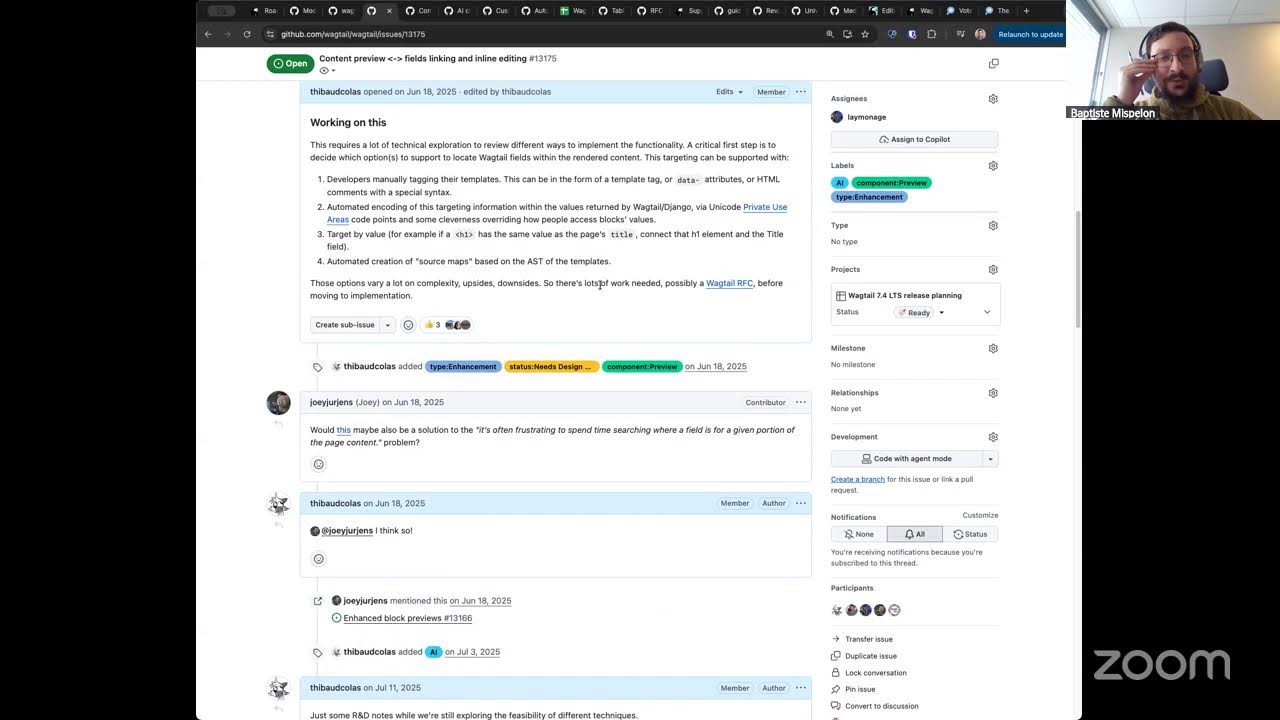
Speaker 2: this uh this UX improvement. Um you spend a lot of time sometimes searching where on the page to edit a give page because you know it's easy to look at the content as it is rendered for CMS uh for sorry for site users but then doesn't necessarily mean it's simple to find in the form where the fields are So we really like to make it easier for people to move from a given part of the rendered page to the corresponding editing interface So here I think the idea would be that you could click this heading in the preview and go to the heading in the rich text editor.
Speaker 2: Is that what we have in mind, Sage?
Speaker 3: Yeah, something like that. Or maybe uh maybe also the other way around. Um I'm not sure if that would make sense, but um yeah, b basically but better way to find your way around based on the rendered content and the form fields so that you don't have to scroll them both separately trying to find where it is. Because w where the field is displayed in the admin and where it's rendered may be different depending on how you structure your templates.
Speaker 2: Yeah. And if I start typing here at the very bottom, um it would certainly be nice if it was a bit easier for me to see what I'm typing in the preview at the same time so maybe some amount of synchronized scrolling where um you can always see the results of what you're editing to the right
Speaker 3: I think if I were to have something like that, I would like to have it toggleable. Like if I yeah.
Speaker 2: Yeah. It could be very distracting if you want to focus on your editing, although I suppose you could also just close the preview.
Speaker 3: No, not just uh the fact that it could be distracting, but let's say you want to see how it would affect the length of the page and you you have it uh you have the preview looking at a different thing and then you're typing you don't care about the exact changes where it's made but you want to see how it affects other parts of the page.
Speaker 2: I see That makes sense. Um yeah, and uh the rub here is uh this is super hard. Well I guess this is super hard specifically because one of our fundamental design choices for Wagtail is to leave the look and feel the front end of the site completely up to every site implementer. We don't have much control over how they render this visually but also behind the scenes how the HTML is created. So we have to find ways to connect the CMS form and the displayed content. that are compatible with however people wish to display their sites.
Speaker 2: Highlights? Are we gonna make it, Sage? Do we have a solution?
Speaker 3: I think we have some tricks up our sleeves, but nothing concrete just yet. We're still experimenting.
Speaker 2: Yeah. But it's it'll be very interesting at some point to do a deep dive on this feature and see how you as someone who I think has quite a good taste for, you know, Django, idiosyncratic code, idiomatic APIs in Django, how we do it.
Speaker 1: I have a lot of taste for idiotic APIs, idiomatic. I'm not so sure, but I have seen a lot.
Speaker 2: You have seen a lot. Yeah, Sage and I when we have design discussions like this we discuss the cursed factor of a given solution. But maybe Baptiste you have um opinions about this too.
Speaker 1: Uh I I mean when you describe the feature it sounds amazing and then I'm immediately thinking of how hard it sounds And so I found this very interesting, but it's probably way too much for this for today's episode anyway. But yeah, it's it sounds like a very interesting technical challenge because you can immediately I think see the benefit for a user. uh but then when you start thinking about how you would actually implement it sounds I mean to me it sounds impossible, but you know, there are much smarter people than me on this call who I'm sure have thought about this problem a lot more
Speaker 3: We're also hoping maybe someday browsers can just support this out of the box with a nice API.
Speaker 2: Oh
Speaker 1: yes.
Speaker 2: Let's end the call on that the nice API that we all wish for. It's called. Scroll to text fragment?
Speaker 3: Yep.
Speaker 2: Don't know if you spent much time looking at this new new browser feature.
Speaker 1: Yes, the Django website uses it.
Speaker 2: Ah, see? What for
Speaker 1: I don't for search.
Speaker 2: Ooh, can we try it now?
Speaker 1: Uh yeah.
Speaker 2: Can I search for um hm, what could I search for
Speaker 3: Jason Field.
Speaker 2: Oh, Sage So if I click here, it's gonna generate a link straight to them. Ooh, look at that.
Speaker 3: Wow.
Speaker 2: I mean Jason fields are cool Sage but this might just you know Yeah, super helpful. And uh the only problem with this uh this browser feature, this selecting by text is um right now it's only um It's it's tied to this kind of uh um I guess navigating to an anchor style uh in the browser bar with the highlights like the UI and the capability under it are very very tight integrated. So
Speaker 3: like for example, I think the only way to remove it is for you to right click on it and choose remove highlight.
Speaker 2: Remove highlight.
Speaker 1: You can also edit the URL by hand. That's a great UI
Speaker 3: Very friendly.
Speaker 2: Yeah.
Speaker 1: It's I mean, I can see how it could be a solution, but it has the fatal flow of if there's the same piece of text twice on your page, it's just gonna go to the first one.
Speaker 2: Yeah. Yeah. We have um some ideas for like which which heuristics we could use, like having multiple solutions to select uh elements or text on the page go through them in order and um
Speaker 1: I mean the obvious solution is that Wactor should just replace the text uh by HTML where every single character has its own uh ID and then you can scroll to an ID this way It would probably multiply the size of the preview page by I don't know the good ten, twenty
Speaker 2: Yeah, some of our ideas are like that. See you're plenty clever enough, Batiste. We just have an edge because of the time we've spent thinking about it. But yeah, I will have to stop here today just because of time. And maybe we can pencil this as a future discussion topic. It'll be very interesting to see what others like you think of our concepts for this. this technical concepts I mean
Speaker 1: you know where to find me
Speaker 2: Well thanks for joining today and uh say do you do an outro these days with your
Speaker 3: prowess or it's no I don't think I I don't think other podcasts do outros, but maybe I'm wrong. I'll have to do Uh I'll I'll I'll have to find an example.
Speaker 2: Great.
Speaker 1: CG's guitar only plays forward, not backwards, so he can only intros, not outros.
Speaker 2: Um thank you both, it's been fun. Talk soon.
Note: We understand that names change, people change, and bodies change. We respect each individual's journey and privacy. If you have any concerns about a video or need us to remove content, please don't hesitate to contact us. We will handle your request with care and promptly address any issues.