
0:26:08
Django migrations, friend or foe? Optimize them for testing
Published October 13, 2024
This video features Denny Biasiolli at Django Day Copenhagen 2026 in Copenhagen, Denmark.
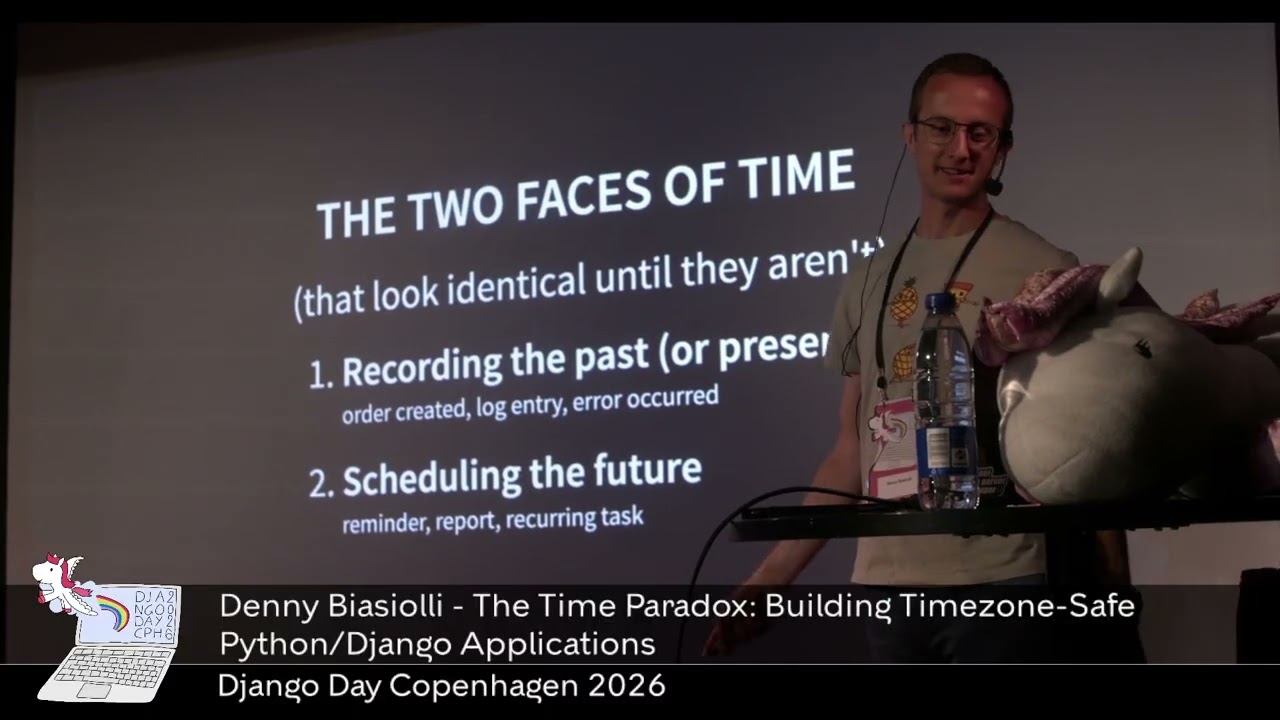
Denny Biasiolli - The Time Paradox: Building Timezone-Safe Python/Django Applications - Django Day 2026
Django Day Copenhagen 2026 talk descriptions: https://2026.djangoday.dk/
Automatically transcribed, so expect mistakes in names and technical terms.
Speaker 1: Welcome on stage, Danny.
Speaker 2: Thank you. Thank you for being here. Today we'll be talking about the time paradox. So lots of use cases about timestamp, time zones, whatever, but let's start. Right now in this room it's almost lunchtime here in Copenhagen, but if we think about it in New York it's breakfast, kind of almost breakfast. But in Tokyo it's dinner time. Oh sorry, I'm talking about food. Sorry. Uh so yeah, we are in the same instant, same exact moment in time, but three different means So we need to decide which one is the correct one. Well, let's see. But first, a quick story,
Speaker 2: horror story from the finance team. April 1st, the day is suspicious, but it won't be. The head of finance in New York joins our quarterly call and asks for A strange question. Why our US uh East Coast revenue is lower, much lower than expected Turned up that 47 large payments from quarter one never made it to quarter one. And no, trust me, it's not an April Fool's joke unfortunately. So a lot of money disappeared from quarter one
Speaker 2: and that led to a wrong tax provisioning and revenue recognitions, payments, different payments and sales commissions in a different quarter, financial statements that the don't match the the quarter close and border and auditor and managers uh asking weird questions What happened? Well, we had this query. Quarter start and quarter end are parameters, not just there as uh a reminder and the query was fine for us so we were filtering the payments uh between the quarter start and the quarter end Well, there's a typo here. That's not the quarter end, it's the next quarter start, but
Speaker 2: bear with me, because we are doing less than So it's fine. And it was fine. We were annotating the quarter number and taking that value and getting the sum of every single uh uh payment in that quarter simple it worked it was trusted by everyone so what's the problem Well, let's look at a payment that never made it into quarter one. So a customer in New York made his payment in uh on March thirty-one at eight seventeen PM local time
Speaker 2: New York time We recorded that in our database as it is. So recording the date, the time, and the offset. But all the queries on the server run in UTC. So in UTC this becomes midnight and 70 minutes So that's a problem because everything moved to quarter two because UTC on the server What should have been done by us? Well, instead of doing the query using Django, we should have run the query manually on the database.
Speaker 2: using this so set the time zone to the customer time zone American New York and then select the quarter or the quarter related to the date. And that would have been 2026, quarter one. What we did, Django did instead on the server, was to set the times on to UTC, and then that leak two quarter two so the pay that never changes but every single value for the front end is converted to uh JSON. So that's not a problem. We are using uh the front-end JavaScript tool international conversion so the customer reads the time in a correct way based on this browser
Speaker 2: The problem is that the dashboard summary we were generating was server-side. The query was server-side. And that was the problem. So welcome to Time Zone Therapy. How many of you have had some sort of similar issue with times, daytime, time zones, raise your hand please. I don't want to be alone. Thank you. And well I have a question for you. How long is the day? How many hours? Any guess? Yeah don't spoil it please just answer twenty-four. But yeah, that's uh remember this question for later on So let's talk about timestamp.
Speaker 2: A timestamp is a specific moment in time and has no time zone. So it's the same number everywhere on the hertz. The time zone that you use only matters when you display this number to a human. What's this number? I don't even know. I want some sort of year, month, day minutes seconds and the offset or my time Python counts the timestamp in seconds With a float, so seconds and decimals. JavaScript milliseconds. Please don't try to copy paste a value from Python to JavaScript or The opposite
Speaker 2: because you might end up in the here 50,000. Please don't do this. And then what is a time zone? A time a time zone is a region that pretends They have the same time. If we think about India and Nepal, they are nearby, but one is UTC plus 530, the other one plus 540. five because yeah why not just create random offsets because someone needs to handle that This is a map of time zones in the real world in 2021, so it should be kind of the same. And we can see all the same colors on the map those should have the same time
Speaker 2: zone This is the difference between a moment in time. So the green line is the time zone. For me, I live in Rome, so it's if I say it's midnight in Rome This is the timestamp that gets written in the database, whatever. But midnight is a specific moment in time, and if someone else from Los Angeles or from Sydney Says it's midnight. It's midnight for them, not for me. So they are not on the same timestamp line. They are on a different time zone. So the time zone move on the other way Another kind of horror story.
Speaker 2: Yeah, today is horror story day. We should have done this in Halloween. But yeah. So January, uh a customer wants asked the system to send a daily seas uh daily statement at nine AM in New York. Just after breakfast. Oops Sorry. One Monday in March they called us because they didn't receive the the statement and they received it at ten AM, so after the morning uh team meeting What happened? Well, we checked the logs, everything looks normal. We checked the deploy, the code, nothing changed. We checked ourselves, nothing changed in us. And first
Speaker 2: we thought, oh, daylight saving time maybe, but in Europe, daylight saving time doesn't happen for another couple of weeks. So that was our first guess. It turned out that it really was daylight saving time because in the US the daylight saving time happens at a different moment, so a couple of weeks before Europe. So they moved, Europe don't. So that was a problem. Sorry, it doesn't work Adjuster boot? Yeah. So I started to wonder Maybe the problem is New York, USA, so just get rid of those customers and we are fine, we are in Europe.
Speaker 2: Everything is UTC kind of so perfect. Well, they were paying money, so we couldn't afford to lose them, so we need to handle them. How? Well in too different way in case of dayland saving time And in two different ways, uh in cases of ending the time. The first one is when you need to record the past. So when you need to create the timestamp for an order, you need to log an entry on your database or log an error. And the second way is when you schedule the future. So reminder, report, recurring task. For the first one, ignore all this wall of text.
Speaker 2: Just remember this. Record in UTC UTC is the universal reference. If you store that in your database, then it's unambiguous. Sorry for my pronounce because it's always the same reference point. And then you can convert it to the local user time zone, local browser, time zone, whatever. That's the right choice. We will see how to handle the case of Server-side queries, but always remember storing UTC. For the other thing, when you need to schedule something, then in this case, forget about the UTC You need to store the intent. So what the user really wants, they
Speaker 2: want to store the report at 9am in their time zone. So you need to store the time and the time zone of the user and then after storing that When you create the scheduling, when you trigger the scheduling, of course you are not triggering the scheduling forever, but maybe for a couple of weeks, days. I don't know, of just for a day and then you recreate it. Then you generate the UTC for that scheduling time and that's it. So remember store the intent and then regenerate the UTC time every time you you schedule. Remember never store the fixed offset
Speaker 2: because that changes with daily saving time store the time zone. And well where the time zone is stored? Well luckily there's a time zone database handled by every operating system and programming language and it defines rules for every single time zone daylight saving time start and specific rules offset It also contains a rule when in 2011 Samoa skipped an entire day. So imagine having to update a database for that rule. What will you think about that? So how long was that day? Zero hours? I don't know, null, none
Speaker 2: Okay, here's the other two tricky edge cases for daily saving time. The first one is the spring forward when the clock skips an hour, and the second was in the second one is the fallback. when the clocks repeats an hour. For the first one, the clock, for example in New York, again The clock jumps from 2 a. m. to 3 a. m. So there's a moment in time, 2. 30am for example, that never happened that day. So Yeah, that's strange. Some libraries throw an exception, other silently move everything to 330. So they try to solve that so whatever no matter what are you
Speaker 2: using know what your does and eventually warn the user that there will be a change for that day Or just trigger stuff at midnight and it's fine, you don't have to handle daylight same time. The second phase is the fallback. So from 2 a. m. to 1am the clock jumps back. And there's a moment in time that happens twice that day. Again, if it's your alarm clock, just use the second one. So you sleep one hour more. But then again, warn the user, check what your libraries or your framework does and just adjust it or move to uh convenient time
Speaker 2: to avoid this day line saving time strangeness So, back to us. How long is the day? Well, he was right. It depends. So it might be twenty-three hours long, twenty-five hours, zero hour. If you s skip the entire day or the run the standard 24 hours. And remember if you're handling uh the next run like this Always remember to use time zone aware daytime objects in Python because if it's not daytime aware um time zone aware You add 24 hours or a day or whatever, doesn't matter.
Speaker 2: When it's daylight same in time, it moves that to 10am. If you are using time zone aware date time objects then if you add one day or same as 24 hours it thinks about the day like same time changes eventually And it end up at 9 a. m. even if you add 24 hours. So it adjusts based on the use case Again, daytime objects. If they are naive, it means that they don't have uh time zone informations. them so they are using the system your local system time zone whatever it is so the server one your local
Speaker 2: host one It doesn't matter when it runs, it runs based on the system local time zone. But when it's aware, you know exactly what the time zone is because you're specifying that. Let's let's look at an example. So the first one is a naive, so you are not specifying the time zone. The second one is aware. So specifying the the daytime the time zone info so always use the second one please if you want to handle daytime correctly and time zones correctly In Postgres, they have the timestamp TZ column that stands for Timestamp with Time Zone. Well it doesn't really store the time
Speaker 2: zone itself, but when you query from the common line from Postgre or whatever, it normalizes the timestamp to utility Sorry, it converts back the timestamp to the desired time zone. So it's user-friendly because it converts the UTC stored to your time zone. Where can you set the time zone in Postgre? Well there are a lot of different places you can look at them in the documentation. The thing that We are interested into is the last one. So you can set it server level based on the connection string, database, user, session, transaction. Doesn't matter because Django uses the last one.
Speaker 2: So for every single transaction it runs in the database, it starts with set local time zone two. server time zone and then run the transaction. That was the issue we faced because our server time zone was UTC And then every single query was run in set local time UTC. Then if you want to handle time zones, and we were handling them you need to use time zone equal true in your Django settings that's enabled by default so You shouldn't think about that. And this means that all daytime
Speaker 2: fields will be stored in UTC in the database, but they will come they will be converted to the active time zone when retrieved and where Django reads the active time zone? Well as we say it from time zone and by default the time zone is set to UTC You can set it to Europe, Rome, London, Copenhagen, whatever. But that will be the time zone for your Django application. The entire Django admin, everything. If you use the fancy Django admin ear filter, ear day months on the top of Django Admin. This will be the time zone you will use for your filtering. So remember that if you are filtering financial movements in your Django admin
Speaker 2: and be careful So when you use Postgre and Django, as I said, everything is wrapped and used with set local time zone using the currently active time zone The problem is that every single user in the world will be able to see your junk application using the time zone you set on the server. So that's not a problem because that time zone will be used to query to database as well. So what can we do instead? Before starting the filter, we can use a Django
Speaker 2: utility called um time zone dot activate so before every single query we can activate a specific time zone using this command so if we add some sort of parameter to the uh management utility in the Django interface then we can use that parameter to enable the the time zone so instead of using the time zone you set in the jjango settings It will use that one. That's better. But there's a but if you want to run a fiscal report, then okay, it's fine, they can type it But if they come from a browser, maybe you want to enable their
Speaker 2: browser time zone by default, so you can read that from a cookie. If they come from uh APIs, you might want to read the time zone head x time zone header custom header or if they are logged in and you have a profile user preference in the user profile you might want to read that from the user profile What can we do in a single point where we can create a middleware, a single middleware, where if the user is authenticated and you have the user profile, we read the time zone from them Otherwise, we can read the time zone from a header or a cookie and then activate that by default instead of using the Django default one.
Speaker 2: And that's for everything. Then if you want sorry if you want to use a specific time zone that they can set for a specific fiscal report, for example, just add that as a parameter in the in the front end facing part and pass it so three rules and then I leave you to lunch Please always use times on aware daytime because they are trustworthy and at least you don't have to do proper math when you add hours day whatever second one always store in UTC on your database on your server
Speaker 2: but display things in the local time because UTC is reliable and you need that to store, but local time is what users are expecting. One exception might be your logs, because your logs stays maybe on the server, we don't know, but if you log using a local time then if you look at those logs from somewhere else in the um somewhere other place in the world you might want to read at different time so use utc for your log So it's universal and everyone can read. Last but not least, ask the time zone for sensitive operations.
Speaker 2: like fiscal reports please and don 't rely just on the server time zone because uh that's not enough or a fixed time zone for all users because that's what Django is doing Then again, remember a day is not always 24 hours and the time zone math is not real math. So please after you wash your tears, test everything. Now, thank you very much. You we can go to lunch if you don't have a question.
Speaker 1: Let's see if anyone dares to ask a question. But we do have time for questions, so seriously. Uh yeah, there's uh one question. There and one question more in the back and one question more. Okay.
Speaker 3: Not sure if it's an unlikely case, but uh if you have this world company and you have uh someone in uh east coast uh in us and you have some in europe um how would you do the query if you want to do it uh globally for the entire company and then Q1 because as your graph showed uh the line shifts throughout and you and um I'm wondering could you do that in a query?
Speaker 2: Well, not really, because it depends where the company is based. So when we are generating our income or our profit takes on payments, for example, if we take 2% from every payment and the company is based in UK. in this case, we need to generate our taxation models, everything based on the UK time zone. So that's I changed a little bit because it wasn't UTC. The main company creating the Django application is based in UK. So the time zone of the server was UK. One hour of difference, but yeah.
Speaker 3: Yeah, could I add a sim simple question? So uh you could guess that there are deadlines for payments. Uh And if you talk about deadlines, are they are they paid within the deadline if if you store the UTC it 's not a good idea? Because we were
Speaker 2: thinking of generating every single report based on UK Time zone. The problem is our customers, they didn't want to generate the report in UK because that was only our fee. Like the 1% on their quarter one earnings the problem is for them when they need to pay taxes they need to pay taxes on on their time zone so their monthly or quarterly um Payments span, they want to pay for that, all those payments, and they don't want the last four hours of March to be quarter two. But that will be quarter two for us, not for them.
Speaker 2: So there's this difference. The customer needs their time zone for their taxation purposes We need our time zone for our taxation purposes. And that will never be aligned. Never. We need to remember that and we weren't.
Speaker 1: Yeah, uh in the back.
Speaker 4: Yeah, yeah. Here. Thank you. Following up on the question, so the recommended uh solution to to uh deal with the time zone issue broadly is using the middleware in that case, right? To handle you know based on the cookie or a time zone or uh uh the fallback
Speaker 2: Yes, because that way you can adapt by default to the browser time zone to the API tool they are using time zone and well in the end the most correct solution for us was on the financial report Ask for the time zone because even in even for me I'm using my laptop from Europe Rome but I'm setting everything based on the UK because It's their laptop. So there's one hour of difference for that. So even for a user that is traveling, for example, I'm moving to US for a week because Conferences, whatever, I'm changing my local time zone to that one to be able to see the time zone.
Speaker 2: And if by default I'm sending that one To the server and I need to do a fiscal report for my UK company, then but if by default I'm passing the browser time zone, that will be bad. So for sensitive operations, always ask for the time zone because people moves, people travels, and that's fine, that's correct. But They want a specific time zone. So remember that warn the users even in this case you are generating a report with this time zone. Even in the Django admin currently, if you are off by More than well if you're off by at least one hour from the server in the Django admin
Speaker 2: there something like uh you're uh more than one hour uh from the server time zone but yes but the time zone the timestamp that they are suggesting is the server one is my one What's that? So that's even difficult. And well for the Django admin uh we customized our base uh admin. I don't remember, sorry, my The base uh template for the admin, adding um a JavaScript script, yeah, uh passing the browser time zone as a cookie
Speaker 4: Okay.
Speaker 2: So we can read that from the from the server. That was a custom solution for us.
Speaker 4: Thank you, thank you. Uh uh I know it's uh lunchtime, but
Speaker 1: Just wanna add that.
Speaker 4: The last thing. Uh using um uh time zone in the settings force Post egress to add the time zone awareness to the uh every single query goes to the database, right?
Speaker 2: Yes, because when you are using timezone. activate, that will be your final call on the time zone you are using for Postgres queries.
Speaker 4: Understood.
Speaker 2: I tried just with Postgres. I don't know about my SQL if someone tried with that I'm No, okay, perfect.
Speaker 1: Yeah. There's uh one more question there and then one from the internet.
Speaker 5: Okay, this might be tricky for the hallways, but anyway so if I pay at the end of Q1 so it goes into my expenses for Q1 the money arrives three days later into your bank account into like Q2. So what's happening there?
Speaker 2: Well it depends if you are not using instant payments That I I don't really know that if we should count that from the moment you paid or from the moment we received the money. Maybe for you is when you pay because money are leaving your account right at that moment. But for us, it's three days later because we receive the money three days later. I don't really know, luckily. So but it might be something like that. There are two different dates, the date of the operation and the date of receiving the money. So I don't know No, I don't know.
Speaker 6: Yes, uh Rosamund from the internet would like to know um do you have examples of which libraries and frameworks are DST aware and which or
Speaker 2: not? Ooh no because in our case we scheduled everything at midnight as I Say it uh just to avoid uh the daylight saving time thing. We weren't handling that, we were handling with uh naive uh timestamp so we were adding 24 hours to every single schedule and that was bad but we just added the time zone in there and that fixed it for us
Speaker 1: All right. Um yeah. We can talk in the lunch about building a flight uh aviation ticketing system, you know, like with uh each stop you have to display in different time zones. Uh and uh this was really really interesting so thank you so much.
October 2, 2026
Copenhagen, Denmark
Note: We understand that names change, people change, and bodies change. We respect each individual's journey and privacy. If you have any concerns about a video or need us to remove content, please don't hesitate to contact us. We will handle your request with care and promptly address any issues.

Published October 13, 2026

Published October 13, 2026
Published October 13, 2026
Published October 13, 2026

Published October 13, 2026
Published October 13, 2026
