
0:43:39
Django Authors Panel
Published November 3, 2017
This video features Mark Lavin at DjangoCon US 2015 in Austin, Texas, USA.
Intro to Client-Side Testing
Intro/Background
Example Project
Getting Started with Selenium
Navigating pages
Finding elements
Waiting on actions
Unittesting with QUnit
Why QUnit?
Tests and assertions
Test fixtures
Additional Resources
Q&A
Help us caption & translate this video!
Mark Lavin explains a practical testing strategy for a Backbone-based file-upload application backed by a Django REST API. Selenium integration tests drive a real browser to check user-visible workflows such as login, form submission, uploads, and error states, while QUnit unit tests exercise client-side models and views in isolation; Sinon.js can mock API calls and events. He recommends explicit waits, stable selectors, and combining fast unit tests with slower, potentially fragile end-to-end tests, and shows how to run QUnit tests with browser tooling or Selenium.
Summarised automatically from the transcript.
Automatically transcribed, so expect mistakes in names and technical terms.
We'll just repeat all of the things that you just said. I work for Cactus Group. I'm the co-author of uh Lightweight Django. You can find me on Twitter, I'm Dr. OYS, I'm MLavin on GitHub and the rest of the internet. If you can help me acquire the MLAV and Twitter account, like come see me after , be interested. So what's the what's the goal of this talk? The goal of this talk is to get you started. Writing tests from a practical standpoint. This isn't supposed to be an in-depth review of all available JavaScript testing tools.
And I'm not here to convince you to do testing. Like that argument I don't think needs to be made anymore. Especially not in this this community. So the workflow is I'm going to show you a little example project. I'm going to show you some integration tests for that project, and then we'll go through some unit tests for that project. So what are we gonna test today? This is a a project that lives on fileapi mlavin. org uh and the source code is available on my GitHub account. Um It's a minimal REST API using JSON web tokens for auth. It does drag and drop file uploads.
There's a limit. Please don't try to upload like 100 gigs to my server, please. The front end uses backbone. I'm not going to show you any of the code for the views, any of the backbone code. I'm only going to show you the tests. If you want to take the time and review the project code itself, do so in your own time. It looks like this. You log in, there's a guest login. When you uh after you log in you see this blob and an empty line because I didn't spend any time styling this. When you drag a file, it's there, and then there's a little X and you can delete it.
That's what the project looks like. On the back end it looks like this. There's not that many views. There's the API root, which renders the single-page app. There's a an endpoint to exchange an API token. Uh of the username password for an API token You can get uploads to list all uploads, you can post a new upload. You can get uploads, like details for a single upload, you can delete an upload. There's no put for updating. Yeah, it's super restful. But users don't care about rest. Like users don't care about how restful the backend is. They want to do things on the site. They want to log into
the site. They want to navigate around, they want to submit data, they want to see their data. And so those are the things that you want To test to make sure that this works as expected. And that's what Selenium is really good at. Selenium drives a browser And you can interact with the DOM. You can fill in data. You can click links. You can assert things about the current state of the DOM. Some basic Selenium setup, this almost comes straight out of the Django docs, is to use the Live Static Server test case. And do some setup teardown of the Selenium web driver. The setup and teardown can be a little slow.
That's why it's done once per class rather than per test. That means that you don't get perfect test isolation and it can lead to problems. I like Phantom. js for the driver. It's a headless WebKit browser you can install with NPM. You could replace this with Firefox or Chrome or IE or you may want to run your tests against all of them. That's all available options. Phantom JS also works well. It's installed by default on Travis CI, so it integrates well with CI environments. A Selenium test looks something like this. You tell the browser to get a page, and then you assert something about that page.
So I say when I get the page, I should see the login form. So I find that login form by its HTML ID. And I look for that little DOM element that's the file upload and they shouldn't the user should not be able to see that if they haven't logged in. Moving on to that, you can fill out forms. So we have a login form, we know it's there. We find it and we get the inputs by their name. There's a username input and there's a password input. And you use send keys to emulate like user typing in the form. You can also make this work with you know select boxes, uh
file inputs, you can do all all those things. You can fill them out. The nice thing about Selenium and the reason you need to use this the static live server test case to get really meaningful tests is that if you try to do interactions like filling in forms and that form element one isn't found, it's going to error. But more so if the form element is in the DOM but it's not visible to the user, it will error which can give you something uh far more meaningful than what like Django's test client can give you. Not just that it's in the DOM, but that's actually visible to a user. Then you can submit forms by either submitting the form
element or by you know we could have found the submit button and hit uh hit clicked it This is a little helper method. This isn't actually a test itself. A test for this might look something like this. I want to you call my little helper to log in, and then I need to wait for the browser. I need to wait until something happens. In a traditional web application, this might be like a redirect to another page, and I need to wait. for that redirect to happen. In my single page app, I need to wait for the API call to go to the server and come back and then the DOM is going to change. And I'm asserting how I expect the DOM
to change. In this case, I'm going to wait until I can see the upload. It should now be visible And I'm going to wait five seconds. Uh it 'll error if it takes more than five seconds for that to happen. And then again, I'm going to assert things. So the file upload area should be visible and now the login shouldn't be visible to the user. That's what I'm asserting here. Uh there are also implicit weights that are available in Selenium, um and those just wait for a set amount of time. Um Sometimes writing these assertions on how it should explicitly wait can get a little tricky and it's like a cheap fallback to just wait, but if you just say wait
for a second And you start doing this in a lot of tests, you've added a second to each test run. And then you've added another second to each test run And it really starts to add up. It can really add useless time to your test running. And these tests aren't particularly fast to begin with. So, you know, follow the Xenopython. Explicit weights are better than implicit weights. Users aren't always right. So other things you might want to assert with Selenium would be like they fill in their password, but they miss a character. And they should see an error and make sure that you're rendering the errors correctly.
These are great end-to-end tests, but they're slow and they can be fragile. If you're thinking about how we're building these assertions You know, we're finding elements by HTML ID. We're finding elements by class name. Um If a front-end developer or designer comes in and tweaks some of the class names, now this test fails. Even though like the functionality should still work, my test fails. or if the error message changed slightly. So you want to use these as they couple well and pair well with other tests in your test suite. So these are integration style tests.
Let's talk about pure JavaScript testing. Um you know for edge cases, really tricky logic, it's hard to beat like isolated unit tests. And sometimes this goes out the window when we write JavaScript because we're primarily Python focused. But I feel like the Django community really values testing. And maybe the reason is you know people don't know what tools are out there. And part of why it's hard to know what tools are out there is that in the time I've been talking about this slide, I think like eight more testing frameworks have been written for JavaScript. So I'll tell you about the ones that were in existence uh
when I started my talk. Uh some of the popular ones are QUnit. Uh Mocha, Jasmine, Karma, Protractor. I mean you they sound like testing frameworks and you probably would have Googled Karma and thought like yeah definitely Like that Jasmine, that was the one I was thinking of. Um so I'm gonna save you some trouble and tell you to just use QUnit I'm gonna tell you why, and if you don't agree with my why, you know, check out one of these other ones I like QUnit because it has a familiar X-Unit style, that style that everyone has ripped off from small talk since the beginning of history.
There are other frameworks that choose to do a more like BDD style, like that lettuce cucumber style that we would have in Python. Those would be like Jasmine and Mocha is actually really weird. They're like, just choose however you want to write your tests. And you know. You kind of want things to be a little more opinionated, or I I like things to be a little more opinionated. So um Jasmine is is a very popular BDD style testing framework. If you like XUnit That's a a bit or high barrier for some people. If you like X unit, um use Q unit It's used by large projects like jQuery and Trey Hunter. I don't know if he's here. Thank you.
He's added this to Django 1. 9. uh fantastic work to cover unit tests for the admin um setting up q unit um is about creating a static HTML page which includes all the uh QUnit pieces. There's some CSS for QUnit, and then there's the QUnit um JavaScript itself. For my project, or the project I'm showing you here, there's the code that we want to test, which is the models and the views. the backbone models and views, not Django models and views. And it uses backbone, so it depends on
backbone, which depends on underscore and depends on jQuery. So those are all included. And then at the very bottom I have two new files. That's the test models and test views. I know that this the end script tags are missing. That's like a weird error with reveal. js, which is what I'm using for my slides. So put your script tags in there. They're in in the repo. Our first qunit test uses qunit. test, which names the test and then has the test function itself. The test function is given a single argument, which is the assertion pieces.
And It has all the assertion APIs you kind of expect from XUnit, like expect or assert equals or assert okay or assert not okay or not equals In this case, and you don't have to know too much about backbone, I hope, to at least read what this test is doing I'm creating an instance of a backbone model similar to a Django model, and I'm asserting that a method call, URL. that the method call returns the URL that I expect. That's that's really it. So again, pretty standard unit test. Create an instance of a class. Call one method, assert one thing, um, just what you want from a
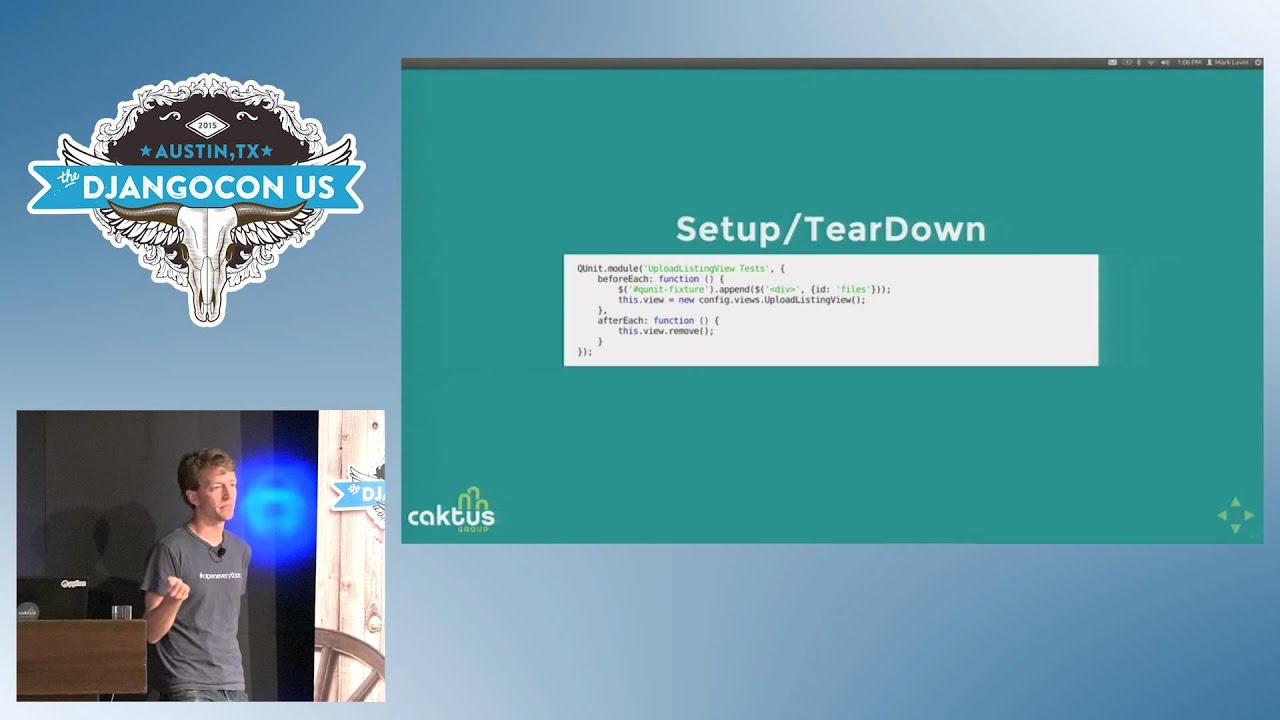
unit testing. Things you're also probably familiar with from unit testing are things like setup and teardown. I mean we were looking at setup and teardown for Selenium. They don't call it setup and teardown anymore. They call it before each and after each. And it it uses a Q-Unit module. This is the thing that I hate the most about QUnit The module groupings of tests are implicit by ordering, so any test declared after this is part of the module. And they're all part of the module until their the file ends or until there's another module declaration, which is
Clearly not Python. Uh so in this case, um I want to start testing I want to start testing my backbone views. Um so before each test, I'm gonna create an instance of that view and I insert it into the DOM. And then after each test, I rip it out of the DOM. So for every test that's gonna run, I get a fresh a copy of my view that I'm going to test. Any state that you attach to this will be available using this inside of any test in the module. So any test after this module has access to this. view. Because everyone understands how JavaScript
this works, right? So here's a test that tests this view. Again, I want to call a method on my view. My view has a method called add file, and it takes an instance of a model So I create an instance of the model, I call the method, and I assert that there's a new DOM element. And I could assert more things about that DOM element. I mean, this is pretty minimal. I could assert like the text of the DOM element, or I could have looked at scene. uh how the DOM element relates to the the model itself. But
you know there's there's no user interaction here. There's no user. Right? There's no clicks or API calls. This is just calling methods on objects and asserting what happens when you do them. As a little bonus, uh QUnit doesn't come with any mocking, uh, but it does play well with a library called Scion. js. I think I'm pronouncing that right. Also super Google -able. So in this case I want to mock a thing. This view, this other view I want to test actually handles the drag and drop. So when the file gets dropped, it makes an API call to the server to post.
And the server's not running when you load this page, so I need to mock that call. So in my setup teardown you know not setup tear down but my before each after each I create an instance of the view and then I patch the collections create method And again, there's a little bit of backbone to know here, but collection create actually does that post to the server. And then a test which might use this is again I want to fake like a user did a drag and drop. So I create a fake DOM event. called drop and then digging deep into how drag and drop
works in JavaScript When there's a drag and drop, there's a data transfer, and data transfer contains a list of files that the user is dragging. But I'm again constructing it like a user just clicked and created this event. And then I uh call the drop callback, which would be called in this case. and um assert that create would have been called. The API call would have been called and I could assert again more things about what that call would be. There's some hover state there for the drag and drop and it gets asserted here as well, but it's not
really part of the mocking To run QUnit test, you just load that file in your browser. And it looks like this. It highlights all the things as they run. They run usually pretty fast. There are command line tools to automate this. You know, you can use your favorite node task runner like Grunt or Gulp, or you can just use Phantom on your own. Of course, we also know a cheap way to automate things in a browser with Python. It's called Selenium. So we could just load this file with Selenium and then assert that there weren't any failures by reading the DOM. It's kind of a cheap way.
Um I don't know that I would do this if I had a huge test suite of QUnit, but it lowers that barrier of entry. Like grunt and gulp are like non-trivial things to add to your stack. You have to really be committed to add them. So this is a way to sort of get started with Q-unit tests. Um and you know, without all those tooling uh pieces. Um So for this project, when you run them, all these things run. Um there are Selenium tests which drive this browser interaction. There are
um Q-unit tests which cover the client-side interaction. There actually aren't any Python unit tests uh for all the uh view code, but those are pretty, those wouldn't be hard to write. Um just too lazy. But this actually gets I think like there's like two or three lines that aren't covered uh in this case which are like all the 404 handling like you asked for a file that doesn't exist like The user can't do that in the user, like in the user interface, the user can't easily do that. So it's not covered.
Uh some resources. Obviously the Django documentation on testing is you know your first go-to place. And the Python Selenium bindings also have great um Great descriptions of all those uh API methods for waiting on events. There's different ways to find and detect. uh when the DOM changes. In my cases I was waiting for the visibility of an element, but you can wait for the title of the page to change, you can wait for things to disappear or reappear. There's lots of different ways that you can use that The Q unit docs and the Scion. js docs also very helpful.
Some photos are still from Flickr, Creative Commons, thank you very much. My slides are available on this extraordinarily long link, which I'll tweet out. I didn't use the uh Libyan DNS, bit. ly. com. uh to do it but uh we have a book signing at 250 as well. We actually do have like five minutes So I will take questions either now or then or everyone can run and get some lunch or find out who won the Microsoft contest Thank you.
Use Selenium to drive a real browser: load pages, find and fill form elements, click controls, and assert changes in the visible DOM. Django’s LiveServerTestCase provides the live server needed for meaningful browser interactions.
Discussed at 3:18Use Django’s live static server test case and create and tear down a Selenium WebDriver once per test class. Mark Lavin recommends PhantomJS as a practical headless driver, though Firefox, Chrome, and Internet Explorer can also be used.
Discussed at 4:04Explicit waits let a test wait for the condition it actually needs, such as an element becoming visible or an API-driven DOM update completing. Fixed implicit waits can add unnecessary time to every test and make a suite increasingly slow.
Discussed at 7:09Selenium is best for end-to-end user workflows, but those tests are slower and can break when markup or CSS class names change. Isolated JavaScript unit tests are better for edge cases and complicated logic without requiring user interaction or a running server.
Discussed at 9:29Lavin recommends QUnit, particularly for developers who prefer the familiar xUnit style. Jasmine and Mocha are alternatives for a more behavior-driven style, while QUnit is used by large projects such as jQuery.
Discussed at 10:17Create a static HTML page that loads QUnit, the application’s dependencies, and the files containing the tests. A test uses `QUnit.test`, receives an assertion object, creates or exercises an object, and checks the result with assertions such as equal or ok.
Discussed at 11:52Use a mocking library such as Sinon.js. For example, replace Backbone’s collection `create` method, construct a fake drop event containing files, invoke the drop handler, and assert that the mocked API call was made.
Discussed at 16:33You can load the QUnit test page in Selenium and inspect its DOM to verify that there were no failures. This is a relatively simple way to get started before adopting tools such as Grunt, Gulp, or PhantomJS command-line automation.
Discussed at 18:54Note: We understand that names change, people change, and bodies change. We respect each individual's journey and privacy. If you have any concerns about a video or need us to remove content, please don't hesitate to contact us. We will handle your request with care and promptly address any issues.

Published July 15, 2026

Published July 15, 2026

Published July 15, 2026

Published July 15, 2026

Published July 15, 2026

Published July 14, 2026

