
0:48:58
Day 1 Lightning Talks
Published June 6, 2023
This video features Markus Holtermann at DjangoCon US 2016 in Philadelphia, Pennsylvania, USA.
DjangoCon US 2016 - SSL All The Things by Markus Holtermann
Over the last few years SSL/TLS encryption of not only websites but many other services as well has risen tremendously. The Let’s Encrypt organization and certificate authority (CA) makes that pretty easy. Since September 2015 almost 1.8 million certificates have been issued. And you can use it, too. For free!
In this talk I'll demonstrate how to integrate SSL/TLS and point out some common pitfalls. I’ll briefly layout the Let's Encrypt ACME protocol and explain what you need to set up in Django to make SSL/TLS the default and only way to access your site.
Markus Holtermann explains how TLS protects web communications through encryption and signing, while noting that availability must be handled separately. He covers secure Apache and Nginx configuration, including cipher selection, protocol versions, certificates, and Diffie–Hellman parameters, then explains certificate authorities, trust chains, and how Let’s Encrypt uses ACME challenges to issue certificates. He recommends automating certificate renewal, securing Django’s session and CSRF cookies, serving sites only over HTTPS, and carefully considering HSTS and HPKP because misconfiguration can make a site inaccessible. He also discusses revoking compromised keys, using Let’s Encrypt certificates for other services, the modest performance cost of TLS, and practical tools for checking SSL configurations.
Summarised automatically from the transcript.
Automatically transcribed, so expect mistakes in names and technical terms.
Speaker 1: Come on, no.
Speaker 2: Um my more regular contributions to Django started in I think twenty fourteen when I picked up every other bug in the migrations framework that was about to be released. And in twenty fifteen the core team decided they were too lazy to merge my pull request and made me do it myself. Which made me become a core developer. Um that was twenty fifteen. Since April I'm working as a senior software engineer at Laterpay in Munich. Um we tried at Later Bay we tried to make online purchasing and selling of goods um more easy and our entire idea behind the process is That it should be really really convenient for you as per um as a client of our merchants to buy digital t digital goods
Speaker 2: And the idea behind which is also part of the name is you are served first and pay later, similar to the way when you go into a restaurant and order dinner Now back to the topic SSL all the things. Ever since Snowden revealed that the NSA is well spying on all of us and that's um the the sec security and the urge for security increase pretty much especially over in germany where we have hu really huge and high data security and privacy standards And that applies to many other European countries as well. And well there's a risk of public for example in public the unencrypted wifi 's w where people might be able to wiretap on the network communications you have, which
Speaker 2: might be the email communication you have And depending on how the email server is set up or your client is set up, this might be the business emails where you reveal the purchase of whatever other cli cust uh company you do And well, you don't want this want the owner of the cafe next door or any other person who is in the cafe to be able to wiretype on your communication. And yeah, so there's some need for encryption there. I mean you also don't want internet service providers to inject advertisements into your website which is otherwise ad -free. So This is something that happens if we have that in Germany, which is really scary and a bad bad user user experience
Speaker 2: and not to mention from a security perspective that is really awful But well but before we go into any details, I need to tell you something more. There's a disclaimer. I'm not a cryptographer, I'm The all the examples I give here are the to the best of my knowledge. If I don't know something, I talk to people I'm trusting that know more about the stuff than I do and ask them therefore their opinion Which still means we are all human and there might be errors in there. TLR. If there's something if you spot spot something in the slides that's clearly wrong, please talk to me after the slide uh after the talk up Outside, I will update the slides appropriately before I publish them. This talk will not cover everything you know about SSL, or you need to know about SSL, TLS, and stuff
Speaker 2: That would be too much for one talk and would probably be done enough for an entire conference. Also, if you think of SSL or here SSL and TLS, I probably always mean TLS The SSL being just the common term for both of them. SSL two and three are broken, do not use them. TLS 1. 0 and 1. 1 are discouraged and you probably should not use them either, but they are at least better than SSL. And future looking cryptographers at Google came up with the implementation of a post-quantum cryptograph uh cryptographic algorithm a couple of days or weeks ago, which is called New Hope, yes, after the Star Wars film. SSL stands for secure socket layer, TLS for transport layer security, but well this is
Speaker 2: just the words. They are both cryptographic protocols for communication system, most notably networks. And either of them provides two out of three parts of the topic of information security. The first one being confidentiality, which is provided through encryption, which means nobody else can read what is being transmitted. The other one is d integrity, which is provided through signing, which means nobody else can change what you send without the receiver noticing. The third part of information security is availability, which is something you need to handle on a different layer. For example, scaling and
Speaker 2: redundancy in your service, but this is something these two protocols cannot provide. Well, now that we are at DjangoCon, we and all the or most of the things we do with Django these days are websites. Let's start with talking about what you need to do to Get a website running and this is obviously a web server. And a web server configuration is something you there which is the first step where you wanna where you where your client where the browser user the browser of a user speaks SSL with when when talking to your website So let's look at what you need to define or configure in your web server to make SSL working up on and get it up and running.
Speaker 2: And well, let's start with Apache T because it comes first in the alphabet. You need to switch on the SSL engine, which happens with this line. Then you want to define a cipher sheet, which is something I took from Cypherlist. I'm one of those websites that provide security standards and and recommendations You want to make sure that also the s the ciphers, the connection between the client and the your server is going to use the ciphers you want, not that the client wants, because that Main mean would mean the client is able to or somebody might be able to um reduce the um security of that connection And well, you also want to use not use SSL, I said before.
Speaker 2: Apache 2. 4 already disables SSL2 by default or doesn't even support it anymore. So excluding SSL3 might be just enough. Um but well you might also want to incl want to exclude TLS 1. 0 and 1. 1 And well then you define the server key and the server certificate. And last but not least there's a thing called Diffie-Hellman parameter, which is used for the initial key exchange between the browser and and your server. And setting a custom one there is also probably a good idea. When you look at the SS uh the at the Nginx configuration, well that pretty much looks the same. Now the question arises, where the hell do we get this certificate from?
Speaker 2: that I was just talking about. And this is where Let's Encrypt comes into play. Um what the heck is Let's Encrypt, you might ask yourself. And how does this entire SSL thing work anyway? And Well, this is a huge complex topic that I try to break down in in this talk. And let's start off with how SSL works or how the How do a how does a client how does your browser know that the communication it does with the server is actually trustworthy And with for that, um let's start with what CAs are. CA stands for uh certification or uh certificate authority And these are trusted entities we or our browsers rely on in order to establish a so-called chain of trust
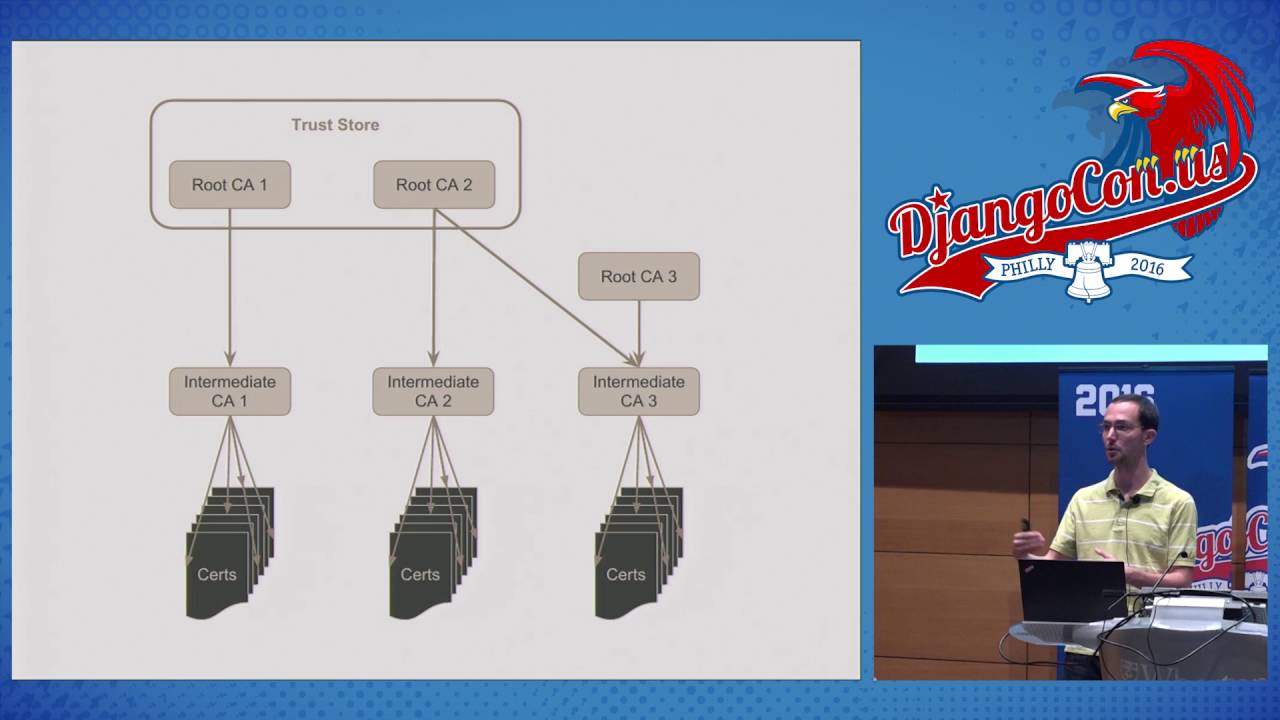
Speaker 2: Browsers or email clients on any other client that has encrypted communication with a with a server have a so-called pre-installed or have a pre-installed list of so-called root certificates And this list is curated by the browser or email vendors, email client vendors such as Google and Mozilla. And they have this list is trusted by them and is called the so-called trust store. The root certificate authorities then go ahead and normally sign so-called intermediate certificates. which are then used to sign certif the certificate you use for your website, for example. They're not signing your website or the your certificate with their root certificate, but with an
Speaker 2: certificate in between. And we can see the reason for that when you look to the right with root CI two and three. Root C as you can see, root CI3 is not in the trust store. So Browsers don't necessarily trust the intermediate certificate that is was signed by that CA. However, if the second CA s so-called cross cross-signed this intermediate certificate, you have a chain of trust from here over there to sell to a certificate you would use on your server and well the connection is trusted. And well, Let's Encrypt is one of these certificate authorities that is not trusted. Or not in a trust store, at least
Speaker 2: not yet. And well They have some another CA that trusts them, which is called in um ident trust. And since Let's Encrypt has um control over their in intermediate certificate They can still sign whatever website they want and your browser is going to trust them. This is probably a good idea not necessarily a good idea, but given some security measures in the back end uh in the background, this is probably a good idea in this um inst this con context. And well, Let's Encrypt offers an API to get pretty much unlimited certificates for a domain you have that is under your control And under your control means you need to be able to provide something on port AD
Speaker 2: via HTTP. By now, Let's Encrypt provided more than five million certificates and they set up like one and a half, two years ago, which is pretty impressive. Now let's look at the process in which you get one of those certificates. And this process is called ACME or Automatic Certificate Management Environment. It's a fairly simple JSON API with some crypto magic that I'm not going to explain in detail, but the entire process uh only has like four steps. And there are three things you need for this process. One being an account key, which is something you need to auth wait that you use to authenticate yourself or your server against the let's encrypt a certific uh a certificate key, which is the one you put in your Apache or Nginx
Speaker 2: configuration, and a certificate signing request request which includes all the domains you want to be signed in your certificate. So the API starts with, well, here I am, this is my key. Um please register me and or authenticate me if I'm already registered. You can provide a email address for example there or pager number in case your certificate is going to um going to expire. But that's is these are optional parts. Then there's this certificate signing request that you send over. And as a response, Let's Encrypt is going to provide you with a bunch of challenges. These challenges, you're writing to a web server directory under a
Speaker 2: provided name with a provider with a specific content Let's Encrypt is going to provide you. And in the next step in this That you have here, you're telling LitzEncrypt, okay, I'm done, I've written all the challenges, and LitzNcrypt is going to request all those challenges on those domains via port 80, what I just said So when you have control over a domain you are able to provide content under a certain domain. If you don't have the content or if you don't have the control over that domain, you can't provide the content, which means this tab has so is secure. And well lastly you request the certificate from Let's Encrypt once all Let's Encrypt checked all the challenges.
Speaker 2: And that's pretty much all the magic that Let's Encrypt does. Well, this is the bare configuration of how you would include the or how you would define the the challenge directory, for example. So there's this um Let's encrypt is going to request something on well-known ACME challenges. So this is the directory or path in the URL you have to provide. And everything else is pretty much explained in there. And well, just for completion, the same for engine X. Now that we know how to how Let's Encrypt is working How do we actually use it? And well there's an official client which does all the magic. Literally, it rewrites your Apache config if you want it
Speaker 2: to And well they are also working as far as I know on the implementation for Engine X. And well while this might be a good idea for people who stu just start with Server management, this is probably a bad idea for enterprises at which point you want to use configuration and system management tools. For the reasoning there, please look watch my talk from 2015 with PyCon Australia Um there's a script called ACME Tiny by Daniel Rosler, which is like 200 lines give or tag. It's easy to understand, it and it does exactly those four steps I showed before. It's a really recommended treat if you want to look start looking at Let's Encrypt. This is gives you a really good idea of how it's working.
Speaker 2: I forked that project and added systemd support and a few other things. And if this exact implementation doesn't work for you, well go ahead, fork it, and adjust it as you want. There's also a bunch of other tools. For example, let's encrypt AWS by AlexGayner, which as the name suggests, supports or implements AWS support. There's a tool called RProxy by Embra Brown, which is a reverse proxy, which just does all the magic. You'd only define the domains and nothing else And well, this is the script we use at uh I use for my websites and we use at Django project You provide the information I
Speaker 2: said you need to and be done with it. You run this every whatever, every month or so. The certificates provided by Let's Encrypt have a maximum expiration uh lifetime of 90 days. Which also means that in case something happens, you've you lost for ninety days, but then the certificate is invalid anyway and nobody can can use it. Being a Django kernel, there's actually not much we need to do adjust in Django to make SSL work. That's one thing or two things you might want to adjust or I recommend you want to adjust. Which is the which are the secure settings for two cookies, which is the session cookie and the CSRF cookie. And also you probably don't want to run your website on HTTP and HTTPS, only
Speaker 2: HTTPS If you want to go into further details on what things you could possibly set, have a look at this list of features Django supports out of the box in in terms of SSL. It does a lot of features that you probably when you use Nginx or Apache would not do in Django but as part of the reverse proxy in before in front And well, let me go through those things in the next couple of minutes. Let's encrypt certificates, as briefly mentioned, are n live have are valid for 90 days. If you lose them or if they are compromised, you can revoke them via an API call.
Speaker 2: Same applies for your account key. If you lose that, you can change that and be safe again. If you lose your certificate key, well this is the same as if you have if you if the certificate is compromised Issue get a new key, get a new signing request, get a new certificate, and you're done. Well you probably want to revoke the key as well, but yeah Then there's a thing called called HTSTS or HTTP strict transport security, which means your browser is after the first wid visit to the HTTPS site is only ever going to request an HTTPS version of this site and not even trying HTTP. Which means if you turn it on and turn it off and disable SSL, then all the client
Speaker 2: webs the browsers that went to this website before cannot access it anymore because you don't have SSL anymore. So if you enable it, be sure about what you do there There's a similar thing called HPKP, HTTP public key pinning, which works on a slightly separate level. It's probably not too useful for most people, only ever when you have like a really big um organization or company and are subject to DNS attacks or so It has the same drawbacks as as HSTS, but it's not ever gonna be a your clients won't be able to connect if you if this changes or if you if you lose the the configuration there.
Speaker 2: You can use um mentionic uh you can use Let's Encrypt or the certificates provided by a Let's Encrypt for any kind of other service that uses SSL. by just providing a service that answers uh that supplies these challenges on port 80 for that domain That's it. You get the certificate for that domain, put it wherever you use it and be done with it. For example, I use it myself for my um IRC bouncer Well, speaking of cryptography, things can go wrong and things can go horribly wrong and there's no finite list of things that could go wrong. HSTS, HPKP, if you want to look use it, please be aware of the downsides and what could possibly happen
Speaker 2: and how you how how bad you can break your site But you probably want to use it. So this is kind of a trade-off. Speaking of cryptography you have keys and well occasionally you probably you you will leak a key, probably o uh hopefully only ever once. Or well hopefully never, but it's gonna happen happen to everybody. So you wanna be able to you have wanna have a process in place to revoke keys. And as said before, Let's Encrypt uh has that implemented and has the feature there, just be aware of that you want how you handle that. People say SSLH
Speaker 2: or TLS that uses lots more resources Yes, of course it does need more resources and computation power, but honestly that doesn't really matter if any of the m more or less modern hardware. So Let's say it lasts four years probably is you probably don't gonna recognize it. Here's uh incomplete list of sources. The first one was briefly mentioned before, cipherlist. It's a good document um recommendation for use these ciphers and use well, this is the configuration you might want to use. The second one is probably your go-to page if something with their SSL configuration is broken. Or if you want to see how good or bad you configured your web service.
Speaker 2: Seriously, this is the like the reference tool from my perspective for is my SSL set up correctly And then there's a couple of blog posts and other resources of how to use or not to use SSL. Thank you.
Speaker 3: So we do have time for some questions. If you have a question, please come down to the mic. For the recording purposes, we've got about five minutes.
Speaker 4: Amigo, how you doing? If you uh turn on the secure cookies, I had two minor questions. One, how does run server handle that And two, if you have to share your cookies from Django with a legacy code base , legacy code base across your domain, say Cold Fusion, how does that work as well?
Speaker 2: One you don't, so which is the reason why I had the good point, I had the environment variables in here So this is something you want to set in production, but you don't want to use in development because development is not going to work unless you set local SSL setup, which is kind of a pain point. The other one I didn't really get.
Speaker 4: Oh if I have a domain, say warden. upen. edu with two subdomains like vagrant. warden. upen. edu and coldfusion. warden. upen. edu. How do I share a cookie across Wharton. upen. edu of secure? Does it still work across the entire domain if you set the cookie for dot Wharton dot you pen. edu and not the actual server?
Speaker 2: I'm not too sure to be honest.
Speaker 4: Okay.
Speaker 2: Read up in the documentation. It should be in there. Otherwise at least if it's uh if it's not, this is probably a topic uh something we should add to the documentation as a possible payment problem and the ask prints please submit a ticket and possibly a patch.
Speaker 4: Well do somebody should also totally do a lightning talk called oh crap I just committed my Django secret key
Speaker 2: That's also a good idea.
Speaker 3: All right, two more questions.
Speaker 5: Sort of similar to the last one, but uh different case. Uh let's say you, you know, so let's say you use a bunch of vendors um possibly ad uh servers, uh analytics vendors, and they're not running on H HTPS. Uh any suggestions on how you can still protect your site or is it just
Speaker 2: Uh there 's n if ad companies or ad networks don't provide SSL. There is not much you can do except for either live with oh your swipe uses insecure content or not use SSL. I might even err on this side of well your site uses insecure content or hope for the people you to use ad blockers and Not load the content. I don't know. No, um honestly there's there's not much you can do. At least the major ad networks that are As far as I read the a couple of weeks ago, they are slowly moving over thr to to HT HS uh to HTTPS.
Speaker 5: Right, slowly.
Speaker 6: Hi, I was wondering if you've used uh Let's Encrypt's built-in certbot utility and if there's any advantages or disadvantages to using the
Speaker 2: Um the Let's Encrypt official client does too much magic from my perspective. I only want my s to get my certificates and deal with the rest mys myself or with tools that are meant to deal with that. So no, I haven't used anything else.
Speaker 6: Okay.
Speaker 2: Yeah.
Speaker 3: All right, one more round of applause for Marcus
They provide confidentiality through encryption and integrity through signing, so others cannot read or modify the communication without detection. They do not provide availability; that requires measures such as scaling and redundancy.
Discussed at 4:12Enable the SSL/TLS engine, choose a secure cipher suite and protocol set, configure the server key and certificate, and supply a custom Diffie–Hellman parameter. The Apache and Nginx configurations are broadly similar.
Discussed at 5:45Browsers use a curated trust store of root certificate authorities. A website certificate is trusted through a chain from the site certificate to an intermediate certificate and then to a trusted root, sometimes using cross-signing.
Discussed at 8:08Use the ACME protocol: register or authenticate an account key, submit a certificate signing request, complete the HTTP challenges under the requested domain on port 80, and then request the certificate. Control of the domain is demonstrated by serving the required challenge content.
Discussed at 10:30The official client can obtain certificates and optionally rewrite Apache configuration, while smaller tools such as acme-tiny implement the core ACME steps without taking over the rest of the system configuration. Markus recommends using configuration or system-management tools in enterprise environments.
Discussed at 12:49Set the secure-cookie options for the session and CSRF cookies, and normally serve the site only over HTTPS rather than both HTTP and HTTPS. Django also provides several related SSL features that can be enabled alongside the reverse proxy.
Discussed at 15:10HSTS makes a browser use HTTPS for future requests after its first HTTPS visit; if HTTPS is later disabled, those clients can no longer connect. HPKP pins public keys and has similar failure risks, so both should be enabled only with a clear understanding of the consequences.
Discussed at 16:44Yes. Any service can use them as long as you can serve the required ACME challenge for the domain over port 80; you can then install the resulting certificate in that service, such as an IRC bouncer.
Discussed at 18:20They do require additional computation, but on reasonably modern hardware the overhead is generally small enough that most people will not notice it.
Discussed at 19:56Cipherlist provides recommended cipher and protocol configurations, and the SSL Labs test is presented as the main reference tool for checking how well a web service is configured.
Discussed at 20:41There is no complete fix: the site must either tolerate insecure mixed content, avoid using that provider, or avoid HTTPS. The speaker notes that major ad networks were gradually moving to HTTPS.
Discussed at 23:04He feels it performs too much automatic configuration. He prefers obtaining the certificates separately and managing the rest with tools intended for that purpose.
Discussed at 23:58Note: We understand that names change, people change, and bodies change. We respect each individual's journey and privacy. If you have any concerns about a video or need us to remove content, please don't hesitate to contact us. We will handle your request with care and promptly address any issues.

Published July 15, 2026

Published July 15, 2026

Published July 15, 2026

Published July 15, 2026

Published July 15, 2026

Published July 14, 2026

