0:44:30
Django for AI: Deploying Machine Learning Models with Django with Will Vincent
Published October 23, 2025
This video features Will Vincent at DjangoCon US 2019 in San Diego, California, USA.
DjangoCon 2019 - Search From the Ground Up by William S. Vincent
Search is notoriously hard. Even a basic implementation trips up many beginners while advanced search is PhD-level complex.
This is a bottoms-up look at how to add increasing levels of search to any Django site. From filters and Q objects to Postgres full text search and beyond we'll cover it all.
This talk was presented at: https://2019.djangocon.us/talks/search-from-the-ground-up/
LINKS:
Follow William S. Vincent 👇
On Twitter: https://twitter.com/wsv3000
Official homepage: https://wsvincent.com/
Follow DjangCon US 👇
https://twitter.com/djangocon
Follow DEFNA 👇
https://twitter.com/defnado
https://www.defna.org/
Intro music: "This Is How We Quirk It" by Avocado Junkie.
Video production by Confreaks TV.
Captions by White Coat Captioning.
William S. Vincent explains how to build search in Django, starting with a GET form and filtered queryset using `icontains`, chained filters, and `Q` objects. He then shows how Django forms provide validation and security, and how PostgreSQL full-text search adds stemming, stop-word handling, phrase matching, indexing, and relevance ranking through Django’s built-in search classes. His main recommendation is to start with the simplest approach that meets the project’s needs, move to PostgreSQL full-text search when basic filtering is insufficient, and adopt hosted services or Elasticsearch only when scale and search requirements justify the added complexity.
Summarised automatically from the transcript.
Automatically transcribed, so expect mistakes in names and technical terms.
Hi everyone, thanks for being here. So this is a talk on search. It's a practical hands-on introduction to search in Django, and it's basically everything I can cram into 25 minutes. So I might go a little fast, but thank you for being here the last one of the day. So I'm going to explain how search works, how to implement basic search. There's going to be code, full text search using Postgres, which is built into Django. And then touch upon more advanced options like Elasticsearch. So if you don't know anything about search, you're going to walk away understanding how it works, how to implement it in Django, as well as maybe some thoughts about how to think about it in your large-scale projects. But so why search? So this is the experience I had personally with adding search. Almost every modern website needs search, and Django, despite being batteries included, doesn't have search.
It's up to the developer. So there's no hand holding and there really isn't a dominant third-party package. There was Django Haystack, which still works. I used it professionally. But now with Postgres there's some other options. But it's really sort of a You build your site in Django and then you go, I need search. How do I do that? So this happened to me. My first major site was a school search site, so um kindergarten through 12th grade schools in the United States. 120,000 uh rows. So that's not that big on the spectrum. But search was pretty important for school search site, and I was utterly lost by all this. And I think it's because to know how to do search, you have to understand Django probably an intermediate level. You have to know forms, you have to understand how to pass logic, uh filtering. And so I was totally overwhelmed.
And then you learn that search is really, really, really hard how to do to do well. So there's all these levels to it. And you know, if you're on an e-commerce site, uh search is Probably the most important thing. So it's good to get it done well. Okay, that worked. Great. So there's working code examples. I'll have a link to this at the end for the basic search and uh full text Postgres search. So very quickly, I'm the author of three books on Django. I co-host a weekly podcast called Django Chat with Carlton Gibson that actually came about because last year was my first time at DjangoCon and I had so many good chats with people that I wanted to replicate that. We have an interview with David Hennemara Hansen coming out tomorrow. And I have a personal site writing about Django. So the last two years I've been able to uh work full-time on teaching Django, which is pretty awesome for me.
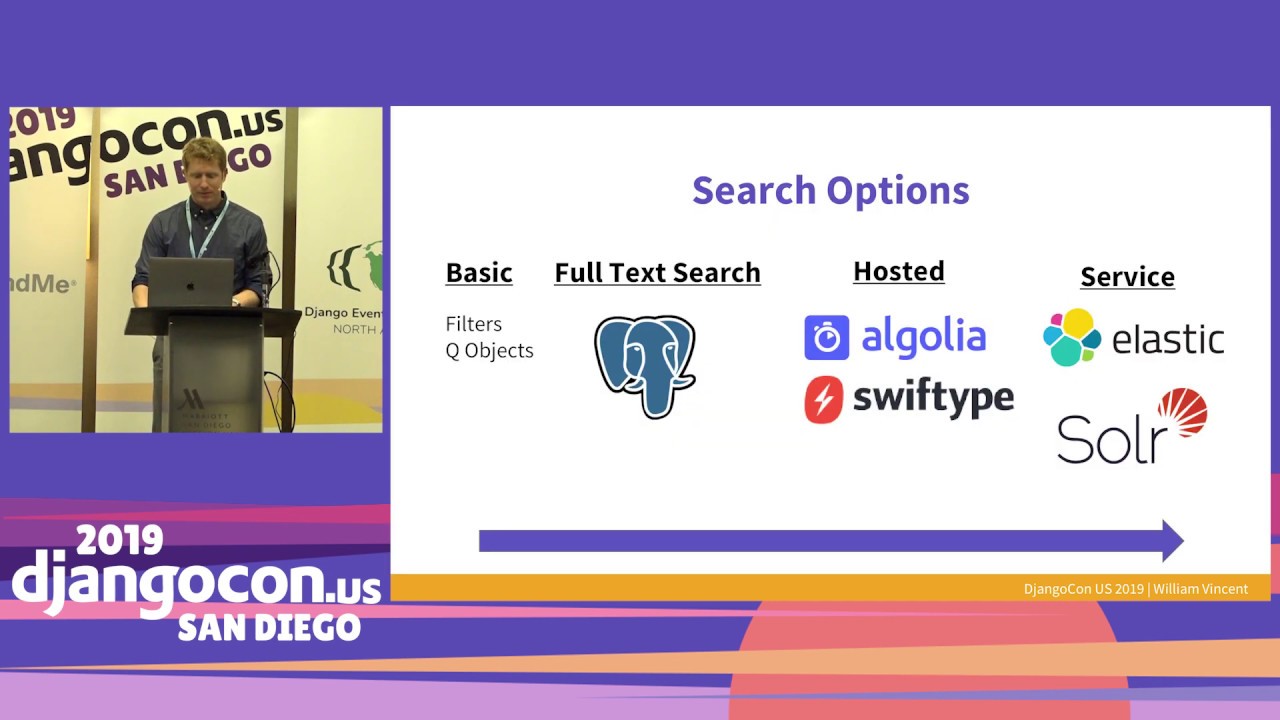
Okay, so this is kind of the journey we're gonna go on, where we have basic search, which is filters, you can do queue objects, we'll get into that. I would say the next step would be Postgres built-in full text search. And then after that you have hosted solutions. So there are many. Here is just two. Algolia is fantastic. Swift type is hosted Elasticsearch. And then you have Really the full-blown services where you're spinning up your own servers, Elastic and Solar. So that's kind of the progression. And I would suggest that you baby step your way along this. It's tempting to just jump to Elastic. Um and you may well need that, but it is a lot to do and do well. So as with many things, don't add stuff you don't need until you really need it. All right, so this is how, certainly for a beginner, this is how search looks. It's just all magic.
You have no idea how it's working. And if you think about it, it's really you have a form, and forms turn out to be pretty complicated and kind of hard and scary once you understand web security. The magic is how do you pass the query? If you've never done that before, that's the scary part, and there's a lot of different ways to do it. I'm going to show you what I think is an elegant way to do it, but there's a lot of different ways to pass that. And then the results. So if it looks like a list view, that's because it basically is a filtered list view. And I'm going to show you how to do that. And if you notice, like I've typed in Massachusetts here, and the results have MA, which is the abbreviations. If you think about it, how does it know that Massachusetts mapped to MA? It wouldn't know that just based on a query. So that's the kind of thing if you haven't implemented search before, you just take for granted that everything is Google.
But Google is really good for a reason. And so, you know, basic search, you'd have to add some good logic to map a full name to the abbreviation. Abbreviation. Okay, so I'm gonna walk through quickly how to start a new project from scratch, because I'm a big believer in not airdropping people into existing code bases. Um but I'm gonna go a little bit fast on this. This is one way to do it, it's how I like to do it, multiple ways to do it, but this works for me. So we first we gotta set it up. So we're gonna install Django. You know, pipem, I like it. You could use pip, it really doesn't matter. Pipem shell, start your virtual environment, start the project. We're calling it CitySearch project. I've added the period. This is an optional one that can trip people up. If you don't add it, uh Django will create a
additional directory. I like to add the period just not to have that redundancy and I find deployments a little bit little bit easier. It's an optional one, but um in my books, this is something where people say it's not working. It's because they missed the period, even though I said use the period. So that's a Be aware if you're a beginner about that. Um migrate the database to initialize it, and then we're starting an app called Cities. So pretty basic. You know, as you this room probably knows, just because we added the app doesn't mean Django knows about it until we add it into the settings file. And this long example, there's an app config file now, so you could just call it cities and that would work, but you're missing out on a lot of extra goodies. So as a best practice, do the full name, add it at the bottom. It's going to load top to bottom. And you would want things like admin and stuff that are on top most of the time.
the time. Okay, models. This is a very basic model. We just have name and state. I've added a meta class because by default, Django will just toss an S on it to uh make it plural so cities with an s is wrong. There's a lot of different ways you can configure meta. This is one of them. So I suggest you look into Meta if you haven't. Okay, we migrated. This is another one. I like to add the app name on make migrations because if you don't, it will migrate all the things that have changed. So if I had two apps right now, it would put both of them in the migrations file, and that makes it a lot harder uh post hoc to go through and debug things. So I like to always keep them as small as possible. Uh migrate it, create a super user. Uh you guys know how to do that. And then admin, you have to update the admin.
This is pretty basic, but if you don't add the admin, it also won't show up. And then this is what the data we're working with. So there's just four states. Um, pretty basic. I'll show it to you, and we're gonna do search and filtering on this. Okay. Let me just update this so I can see a little better. So as a teacher, this is what uh people have trouble with with gen. Django, understanding that you need four files in whatever order to have one web page. Uh if they've never used a web framework before, this is a really tough one and they're gonna blame Django for it, even though it's just kind of how it is if they've used Rails or an MBC framework. it'll make more sense. But if someone's struggling with Django, it's probably this. And from my experience, they just need a lot of reps to understand how these work together.
And again, the fact that the order doesn't matter, you need them all at once and they're all interconnected is a really big leap for beginners. But we're gonna build a homepage with a form and then a search page with results. So again, trying to keep this as simple as we can. All right, so blasting through these steps, uh this is the project level URLs file. We use include, we're adding um cities. Then we have to create the URLs. py file, um which would be nice. if it was in the apps, but it's not. So we're calling at slash search. That's our search results page. And then we have our homepage. So these are views which we we will create. Do note that there's a name added. So this is optional, but this is definitely a best practice to add a name if you want to do reverses, refer to them in templates.
I would say always add a name to your URLs. need it. Again, this is a view, trying to keep this as vanilla as possible. So we're just using generic class-based views, template view just to display the page. The template would be home. html and then list view. There's a lot of different ways to do this. This is the simplest, most elegant way I could come up with, but I'm certainly open to other suggestions after the after if uh you all have to have better ideas. Template structure. So here's another choice in Django that trips up beginners. By default, Django template loader will look within the app for a folder or directory called templates, then repeat the uh app name and then the file. Uh this works if you want to package your apps like a third-party app, but personally I find this confusing.
I like to have all my apps in one place. So you can optionally create a project level template folder um where the files are within there you can create directories within templates this is a choice um I default the project level this sweeps uh trips people up. This would be the code you would add to your settings file. And the important thing is this doesn't mean that Django won't look within the app for a templates directory. It will just also look here. So you want to be clear on how you structure things. Okay, super basic template. Homepage, homepage. And then here's a search template with the result somewhat awkwardly put in there. So we're just looping over again for beginners. Um so for city, we could call it anything we want. We're just picking the variable city
Object list, where does that come from? That really trips people up. It's just built into list view and you kind of have to know it. You can and should rename that to city list or something else, but the default is object list. list and then we're just mapping over our four results. So super basic by design. And now we get to search. So this is how I would implement basic search. This will work on a lot of sites and scale pretty well. And remember, it's just a form with a search query. And we pass it uh a filter on it in LisU. That's the most basic way to do it. Um in the real world you might want to look at the Django filter third-party package that uh Carlton Gibson maintains that has a lot of nice additional features. We're not going to use that. You also definitely want to add validation
to your forms. We're not going to include that here. So you could use this on your personal site. I wouldn't mimic this code on an e-commerce side. Okay, so filtering. So this is how do you update the query set? This is one way to do it. This is the way I like to do it. We update the get query set method and we're using icontains so we're updating the method. The name, that's the name of our field. I probably should have called that something else. That's the name of the city. I contains that's case insensitive. If you didn't have the I, it was just contains, it would be case sensitive. You probably almost always want to use IContains. And then we're hard coding in Boston. So if you look below, that's why the result is just Boston. I'm just hard coding saying basically do a filter
and find Boston. We're not getting a query from the form yet. We're just starting with filtering the results, and then we'll add the form in. You can chain filters. So uh this is an example we've used include on the state. Uh not sure why you'd want to use uh New York and why, but you could. Uh you can chain them together, but you'll quickly find that ands are quite limited. What you really want is an OR. And you can do that with a Q object. So this lets you do more complex Boolean logic. Like an aura. So in this case, we're saying search on the name Boston or the state New York. These are the two results that you would get. So this is basic search. You use Q objects, you can get pretty far with this. It's not really not much code. And you know, if you just have a personal site, it's a blog or something, this is probably most of what you need.
Forms. Okay. So again, this may be uh redundant for the people in the room, but there's two types of forms get in post. A get bundles up our data and turns it into a string in the destination URL. So if you look up the top one, you'll see San Diego. So that was the search term in the URL. So you use get when it doesn't affect state, doesn't touch the database. So like a search, this is how Google does it. You could also do a post when you do want to encode it for transmission, send it to the server, credit card information. Posts are really dangerous, and you definitely want to have some security there which we'll talk about. So for search, use a get. I've seen people do search with posts. You can do it. I don't know why you would do it, but you could do it. So
use a get. All right, this is a very basic raw HTML form. Um Django has its own forms, which we'll use, but if you wanted to just do it raw, this is how you would structure it. So if you look and you can see that the action says go to the search results named URL. That's the name of the URL that we had. So after you've gone, you've clicked enter on the form, it will send you to the search results. results page. We specify the method. It could be post, but it's going to be get. And then the input name. We could call this whatever we want. The default is to call it Q, but you could call it anything. It's just the default is to call it Q. And this will have this nice little form as a result. And so this is what it would give us though. So if you look on this page, the search results page. The uh query is in the URL, but it's not in the results.
And that's because we haven't passed it in. So that's the last piece of the puzzle. Got the query, we put it in the URL, but we haven't passed it into the view. So it's not, it's just hard-coded what we had in the view before. So when I'm teaching this to people in person, it's kind of this step of combining it all and putting the query in and passing the logic that is an aha. moment for people. This is how you would do it. So you can create a variable query, get the Q object, and then pass in that variable instead of the hard-coded values. So this is how I would do this. But there's a much better way, which is to use Django forms. Um so we take advantage of all the Django security work because again forms are dangerous. There's cross-site scripting, there's CSRF, there's SQL injection.
uh click jacking, a whole host of things. Most of those are more relevant with posts rather than gets, but you might as well just take, it also has validation, you might as well take the work of Django. So to do that, you would create a forums. py file in the app directory. Again, as simple as I can make this. And then just in your view, instead of using template view, you would use form view. So you import the form view, you would pull in search form, you can just do. forms because it's It's a relative um link in the same directory and then specify the form class. And then this is what the template looks like. So this is a lot cleaner. If it was a post, we would add the double brackets CSRF tags, but again, we don't need need that because it's a get.
So this is really not much code, and we're really taking advantage of Django, and we've we've gotten most of the way there, but our search is pretty basic. It's not enough for an e-commerce site, and really probably not enough if you're a Django knot and you want to do a little bit better. So full text search. This is the kind of search that we're all used to kind of in the real world. Um so I'm gonna talk through how it works, how to implement it. and built in Django support which was added a couple years ago. So again, just a reminder, this is the journey we're on. We're gonna start with Postgres. Um And I'll show you how to do that. So this is a definition of full text search. So search a document. So a document is any large body of text. So it could be a newspaper article, a book, an email address.
It's really just a blob of stuff. The query, we can add abstractions to decipher the meanings. so we can add some intelligence to the query. And then relevance, this is like the million dollar question. How do you have good results, not just naive results? So we'll go through how to do that. Postgres has had support for 10 years built in. And then starting with 110 in 2016, Mark Tamman led um Django to have built-in support to make this a lot easier. Unfortunately, it doesn't exist for any of the other databases currently, though most of them do have their own full text search capabilities, so that would be a fun thing to work on for today. someone? All right, so full text search features. So this is basically the laundry list of why you would use search. And I'll go through them quickly. So rankings, you want to rank things.
This is how you get at relevance. So maybe you want to have different weights. So if someone searches on a name of a city or a state, it might be more important than one or the other, especially if you have a lot of fields. This is what you tweak and fiddle around with in practice to have your search be good. Indexes, again, speaking to performance, if you've got a million rows in your database, doing a filter on that will not be very fast. So you can pre-process your search and then create indexes. The key thing here is whether the data is static or dynamic. If it's there's two types of indexes. If it's static you'd use uh a gin, this is built into Postgres, and dynamic a gist. So this gets into the trade-offs. You know, how often does it need to be updated? Every second, every hour, every day?
Um these are things you probably just want to test in the real world rather than guessing. Um but that's sort of fun optimizations you can do. Uh phrase search. This is a big one. So this we can do intelligence basically. We could say we could match jumping quickly to uh to jump very quickly. Again, the uh human language has all these sort of intuitive things that we know and we can get at that with phrase search. And it's also uh language specific, so English has its own rules, Portuguese, Spanish would have their own, and there are libraries that will help us with that. Stop words. So common words like the have no real meaning, so it just stripped those out by default. Stemming, you reduce a word to its base stem. So and this is an algorithm, again, that's built in.
So for example, phishing fishes Fisher, it would know that that matches to fish and vice versa. Accent multiple language support, again, there's a lot of languages in the world. And JSON B, if you're manipulating JSON, this is a more performant way to do that. This was added recently, but I don't think have time to get into it. Okay, so this is basically how it works. So it pre-processes the search. So we start with the document, um, turn it into a token. And this process this treats things differently. So it looks at the text and says, well, this is a number, this is a word, this is a phrase, this is an email, and Postgres uses a parser for this. Then it turns them into lexemes. So this is a string that's been normalized. So this would be like upper and lowercase are the same, remove
suffixes like S or ES in English, stop words. You can use a dictionary for synonyms, thesaurus, different spellings, color with a with or without a U. This is where a lot of the intelligence comes in. And then once we have this pre-processed document, then we can optimize it by adding an index. So let me give you a little more examples of that, because that's really the heart of it, but it's uh takes some time to get that. So these are the two data types that Postgres gives us, TS vector, which is the pre-processed documents. And then TS query, which is the process queries. So we can basically apply intelligence to both sides of the equation to have better search. I'll give you examples. So the quick brown fox jumps over the lazy dog is a standard phrase used because it uses every uh letter in the English language.
This is the vector. So this would um this is pre-processing the document itself. This is how it looks to the computer. So it's taking the Lexeme, which is um, so for example, so Brown, its position is the third position. But then if you look at jump. . The actual word is jumps, but it's made it into jump. That's the stem. So the position matters for relevancy. Anyways, this is a very simple way of showing you how it's changed by the computer to be uh into a TSP. vector. We can do the same thing with queries. So this is to normalize our that we can check against our vector. Again using the same phrase There is a match operator which is double at. So if you typed in dog, that would match.
Dogs would also match because it knows to strike strip out the S. Dog food would not, because that's not a relevant phrase. Um jumping would because it sees jumps and it can take the stem and do jumping. So there's a lot that you get out of the box. And then you also need to customize these things over time. And then you there's four default operators. So you're pretty much always going to use a match. So if you had dogs and foxes, that would result to true. You can have ands, ors, or even negations. Okay. Getting close to the well, yeah, getting close to the end. So this is what Django gives us. This is what the built-in package, these are five classes built into Django that link with Postgres and save us a lot of work. The big assumption, of course, is that you have Django
set up with Postgres and how you do that is no easy thing for a beginner. I like doing it with Docker. There's a lot of different ways to do it. In the source code, I have a Docker implementation. so you can just run a command and get it going. In my book, Django for Professionals, I talk through how to set up from scratch Python, Django, and Postgres. That's available for free. But let me just say assume it's installed. All right, so search vector. So this is the ability to add, oh, I guess I didn't talk through what they do. That's okay. The ability to add multiple fields. So in this case, um It doesn't make as much sense with four city fields, but this works, and if you added a real document, um you'd get better results.
So you can see that you can add in multiple fields here as a search vector. Just use this code and try it out and it will work for you. Now a search query, so we can add stemming or stop words. Um it will basically apply logic to our query, um add apply us apply a stemming algorithm. Again, overly simple example, but this works, and especially if you update the data we're dealing with, you'll get more interesting results. The last one is search rank. So this is how you would do relevancy. So in this case, I've set a vector to state. So I'm saying use state. We're using just rank. So the result would be because I'm ranking on state, it would show the two results for Massachusetts, because there's two states of Massachusetts, and then one for New York and one for California.
Um again there's more information in the Django docs, but this is a working example, and if you update the data, you can play around with it. Okay, so that was a bit fast, but I wanted to walk through all the steps and give you a sense of what Django can do out of the box. Umce you move beyond the basics, definitely add validation to your forms, but you can get a basic search up and running. It would be a really cool talk to compare built-in Postgres with Elastic. I'm sure there's a lot of pros and cons, but for the needs of Basic to intermediate site. This will get you most of the way there. And yeah, slides and source code. Thanks for your time.
Use a search form that passes a query parameter to a filtered ListView, typically with a case-insensitive `icontains` lookup. Django forms can then provide validation and built-in protections around the input.
Discussed at 9:32Use Django `Q` objects to combine conditions with OR logic—for example, matching a city name or a state—rather than chaining filters, which produces AND logic.
Discussed at 11:03Use GET for search because it does not change database state and makes the query visible in the URL, as with Google. POST is intended for submitting data that should be encoded and processed by the server, and requires additional security considerations.
Discussed at 11:54Use Django’s forms framework instead of handling raw input yourself; it provides validation and helps address issues such as cross-site scripting and SQL injection. For a GET search form, a CSRF token is not required, unlike a POST form.
Discussed at 14:14PostgreSQL full-text search preprocesses documents and queries into normalized lexemes, removing or handling things such as suffixes and stop words, then compares them for matches. Django provides built-in PostgreSQL integrations such as `SearchVector`, `SearchQuery`, and `SearchRank` to search multiple fields, process queries, and rank results.
Discussed at 18:03Use search ranking to calculate relevance and assign different importance to fields, such as making a city name more important than a state. Django’s `SearchRank` can annotate results with that ranking and order them accordingly.
Discussed at 21:52Note: We understand that names change, people change, and bodies change. We respect each individual's journey and privacy. If you have any concerns about a video or need us to remove content, please don't hesitate to contact us. We will handle your request with care and promptly address any issues.

Published July 15, 2026

Published July 15, 2026

Published July 15, 2026

Published July 15, 2026

Published July 15, 2026

Published July 14, 2026